


The difference between template-based and template-free OCR comes down to how reliant each one is on template to read documents. Template-based OCR provides automated data extraction that’s bound to a fixed field mapping, making it ideal for standardized, repetitive documents. Template-free OCR, on the other hand, offers more flexible data extraction that can adapt to any layout without additional configuration, perfect for handling varying, unpredictable document formats.
Which one should you use? There’s no one-size-fits-all answer on which one is the best. The right OCR model depends on your document volume, how often vendors or formats change, and how much setup time you’re willing to invest upfront.
TL;DR: Key Differences At a Glance
| Criteria | Template-Based OCR | Template-Free OCR |
| Bagaimana Verifikasi Dokumen di Fintelite bekerja | Matches documents to a predefined layout with fixed field positions | Uses ML/LLMs to interpret structure and context dynamically |
| Setup time | Faster for narrow, consistent use cases | Slower initially, no per-format setup needed afterward |
| Accuracy | High, as long as the document matches the template | Generally high, but can dip on unusual or low-quality layouts |
| Flexibility | Low. Breaks when layout changes | High. Adapts to new or unfamiliar layouts |
| Scalability | Limited. Each new format needs a new template | Strong. Scales easily across vendors and formats |
| Maintenance | Growing overhead as templates pile up | Minimal ongoing maintenance once deployed |
| Cost | Lower long-term cost for repetitive, high-volume formats | Higher upfront cost; often cheaper via ready-made solutions |
| Compliance/auditability | Easier to explain and audit (fixed logic) | Harder to explain (model-based reasoning) |
| Best for | Standardized, repetitive documents from few sources | Diverse, unpredictable documents from many sources |
Template-Based OCR
Pros:
- High accuracy on matching layouts: The system already knows exactly where each field sits, so there’s little potential for misreading or misinterpretation.
- Cost-efficient at scale for repetitive formats: Once the template is built, the system simply applies the same logic repeatedly, meaning no ongoing model training required.
- Easier compliance auditing: Because field positions are fixed, it’s simple to document and justify why a specific value was extracted, which matters in regulated industries like finance or healthcare.
Cons:
- Rigid to layout changes: Even a small shift, like a vendor updating their invoice format or design, can drastically break extraction accuracy.
- Growing maintenance overhead: Every new document variant means building and managing another template, which can add more turnaround time and maintenance cost.
- Limited scalability: Keeping up with hundreds of formats becomes harder to maintain as document volume grows.
When to use:
If your organization deals with standardized, repetitive documents from a limited number of sources, such as customer registration forms, sales order forms, or invoices from one or two regular vendors.
Template-Free OCR
Pros:
- Adapts to varying layouts: Leverages ML and LLMs to identify fields based on context rather than fixed position, so it can read a document correctly even if the layout has never been seen before.
- Scales easily across vendors: Processing documents from new vendors becomes frictionless as the system can instantly interpret unfamiliar layouts without needing to be retrained first.
- Handles edge cases efficiently: It performs reliably with the real complexity of business documents where formats, field placement, and structure vary.
Cons:
- Higher implementation cost: Building an advanced OCR system in-house demands significant computational power and training data, which is why many businesses opt for ready-to-use AI OCR solutions instead.
- Inconsistent results without predefined rules: Extraction relies on contextual understanding, not fixed logic, so results can vary across batches. Setting a specific rule on what data to extract beforehand is highly recommended for this model.
When to use:
If your organization routinely processes documents from many different vendors, especially when those formats are frequently changing, such as accounts payable departments handling invoices from hundreds of suppliers.
How Each One Actually Works
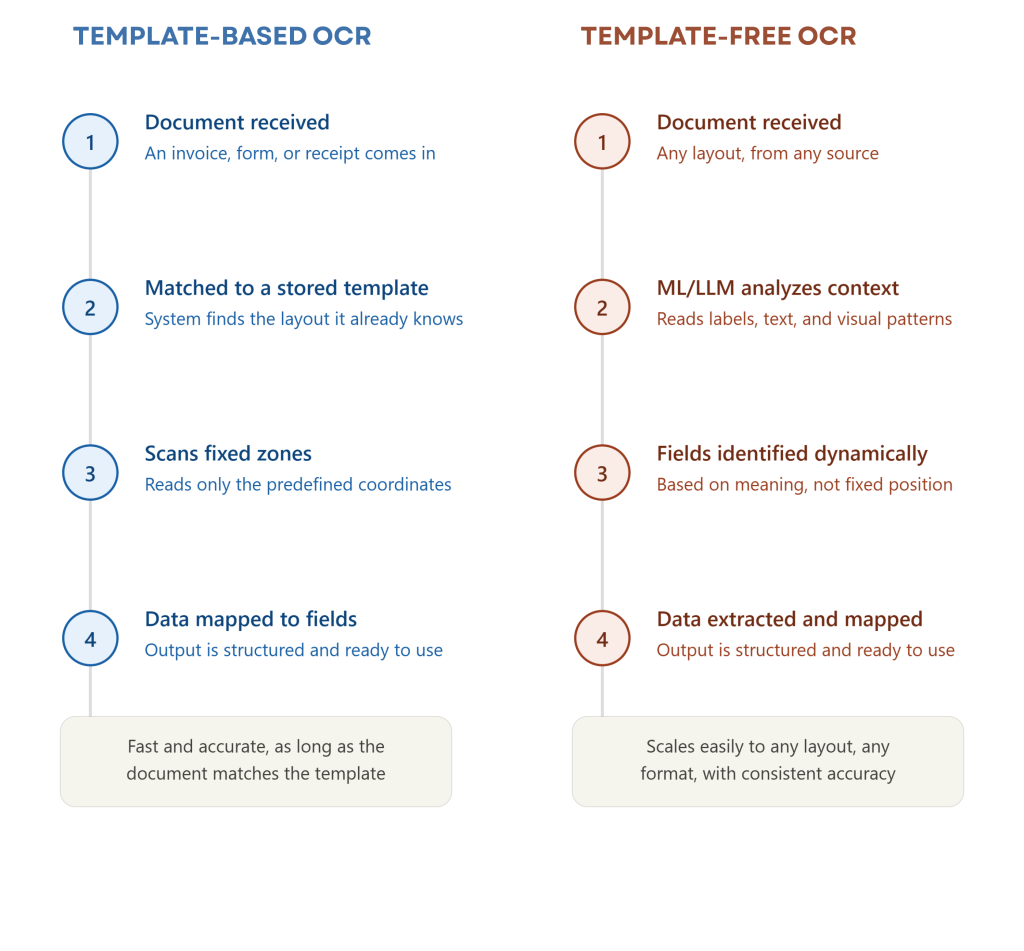
Both approaches start the same way: document upload. Once the document is detected by the system, this is where the extraction process differs.
Template-based OCR matches the document against the template it was built for that defines exactly where each field is placed. For example, “invoice number” always in the top-right corner, “total amount” always in the bottom table. The OCR engine scans only those fixed coordinates and maps the text directly to its field, delivering clean data as a result.
Template-free OCR uses advanced AI and LLM models to intelligently interpret any document structure that comes in. It reads context, such as labels, surrounding text, and visual patterns, to figure out what each piece of data represents. It can recognize that a number following “Total” is likely the total amount, no matter where it appears on the page. The resulting data is accurately structured, regardless of layout.
How to Evaluate Which One Is Right for Your Business
Choosing between these two OCR data extraction models takes careful consideration of several factors, such as document structure consistency, processing volume, implementation budget, and scalability needs. Here’s a step by step guide to help you find the better fit for your business document process.
1. Assess Your Document Types
Start by reviewing the documents you process most often. If they follow a consistent format, template-based OCR may be sufficient. If layouts vary across vendors, customers, or regions, template-free OCR is often a better fit.
2. Evaluate Document Volume
Consider how many documents you process each month. Higher volumes generally benefit from solutions that minimize manual setup and maintenance.
3. Consider Maintenance Requirements
Think beyond implementation. Template-based OCR requires ongoing template creation and updates, while template-free OCR typically requires less maintenance.
4. Align with Future Growth
Choose a solution that can scale with your business, support new document types, and adapt to evolving workflows. As you expand into new markets, onboard new vendors, or launch new products, your document formats are likely to multiply and diversify.
5. Test with Your Actual Documents
Before committing, run a test using your own documents, ideally a mix of your most common and most variable formats, to see how each option performs in practice. This hands-on step often reveals fit issues that aren’t obvious on paper, helping you make a more confident, informed decision.
People Also Asked
Template-based OCR relies on predefined document layouts and requires a new template whenever a format changes. Template-free OCR uses AI to understand document structure and context, enabling seamless extraction of data from varying layouts without per-template creation.
While implementation costs vary by provider and use case, template-free OCR can prove to be more cost-efficient in the long term by eliminating the need to create, maintain, and update document templates. This can be especially valuable for organizations processing documents from multiple vendors, customers, or regions.
A phased migration is usually the most effective approach. Start with document types that have the highest volume or the most layout variations, adopt template-free OCR alongside existing workflows, validate the results, and gradually expand adoption. This minimizes disruption while ensuring extraction quality meets business requirements.
Template-based OCR works best for standardized documents with consistent layouts, such as fixed-format forms, applications, invoices from a single vendor, and internal business documents. Template-free OCR is better for processing documents that come from multiple sources.
