


Documents are the backbone of every business. Invoices, purchase orders, contracts, customer forms, and so on dash — they arrive either as digital files or stacks of paper. Each needs to be entered, checked, and processed in the internal system. From document to decision, it spans multiple steps that can be painfully slow as volume grows.
What if every document could be processed end-to-end without manual efforts?
Document workflow automation makes it possible. It reduces paperwork burden by orchestrating every document processing step into one seamless, intelligent flow. Documents are ingested, extracted, validated, routed, and processed automatically on your terms. While automation does the heavy lifting, your team stays in control to approve and oversee if necessary.
What Is Document Workflow Automation?
Document workflow automation is the use of software to automate the repetitive steps across the document lifecycle. It generally automates document-related tasks such as data extraction, validation, structuring, and insight generation, while keeping humans in the loop where it’s needed. With flexible integration capabilities, it can also act as a central system that connects different platforms and enables smooth, automated data transfer. However, implementations can vary depending on the specific use case and operational requirements.
How Does Document Workflow Automation Work?
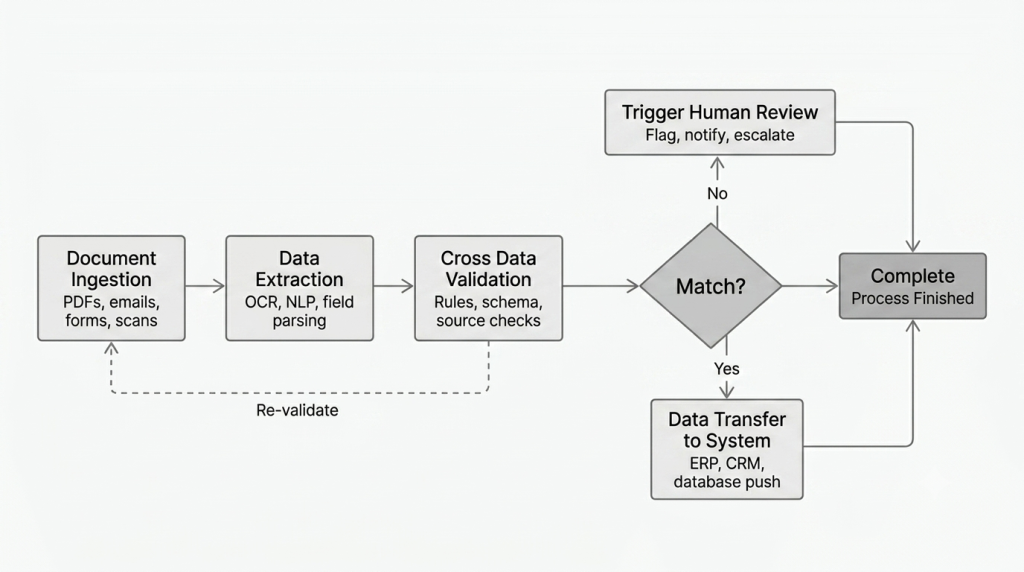
Document workflow automation consists of multiple interconnected steps, each handling a distinct part of turning unstructured documents into fully usable insights. Let’s break down how it typically works in practice:
Step 1: Document Intake
It starts here, where documents are retrieved and routed into the workflow from multiple sources, such as email, Google Drive, or API-linked systems.
Step 2: Data Extraction
Once ingested, specific data points are extracted from those documents. OCR technology plays a crucial role in this process, making the data machine-readable.
Step 3: Data Validation
The extracted data then passes through a verification layer that checks for correctness and compliance. The verification process is done depending on business needs, whether it is rule-based checks, record matching, or cross-document validation.
Step 4: Data Structuring
After validation, the clean data is organized into a standardized format compatible with existing business systems, databases, or ERP platforms.
Step 5: Insights & Reporting
Finally, the structured data is transformed into actionable insights, summaries, alerts, and recommendations that support decision-making for business users.
Essential Components of an Automated Document Workflow System
Looking deeper into the practice, there are several components working behind the scenes to connect these steps into a smooth workflow.
Human Checkpoints
Human oversight at critical decision points, such as to review, approve, or reject documents before moving to the next processing step.
Conditional Routing
Automated routing that sends documents down different paths based on the outcome of a step, for example, proceeding forward if the data is verified, or flagging it for review if issues are detected.
System Integration
Seamless data transfer to or from connected business systems and applications, commonly placed at the intake or output stages to feed in source documents or deliver the final information.
Benefits of Document Process Automation for Business Teams
Companies and organizations can now take advantage of document workflow automation to accelerate document lifecycle. With technologies like AI, OCR, and machine learning powering the workflow, tasks that once took hours of manual effort can now be completed in minutes. Here are more benefits you can expect:
- Faster turnaround. Eliminate time-consuming manual steps as document processing becomes automated from start to finish.
- Automation you control. Leverage automation in a way that aligns with your operational needs, with the flexibility to set your own rules, approvals, and routing.
- Increased agility. Efficiently scales to handle any document volume, even during peak seasons, without adding headcount or slowing down.
- Enhanced accuracy. Drastically reduce the likelihood of human errors during manual data entry with AI-powered data extraction.
- Streamlined document handling. Overall, keep documents moving smoothly through each stage, with everything tracked and accessible in one place.
Real-World Use Cases: Document Workflow Automation Across Industries
Every business sector handles documents differently, each with its own priorities, document types, and desired outcomes. Here are some of the most common ways different industries put document workflow automation to work.
Banking & Financial Services
Loan underwriting is a core process in banking, which involves processing complex financial documents that traditionally took a long time. In this context, document workflow automation can be useful to accelerate data extraction and validation across multiple records, such as bank statements and payslips, saving hours of manual intake and review.
Healthcare
From patient admission to discharge, healthcare providers handle a constant stream of records. Document workflow automation can help extract, validate, and organize this information automatically, so medical records stay accurate and up to date in real time.
Manufacturing
Managing a high volume of invoices from suppliers, vendors, and logistics partners can be overwhelming. Streamline back-office tasks with automated invoice reconciliation that captures invoices the moment they arrive, extracts key details like amounts, dates, and line items, validates them against purchase orders, and routes them for approval.
Insurance
Claims processing requires insurers to review forms and all supporting evidence for every case. Transform these document-heavy tasks into one streamlined flow that extracts all necessary policyholder and evidence information, validates it against policy data, and routes each claim for faster resolution
Your Team — 100% No Code
How to Implement Document Workflow Automation
Now the real question is not whether to automate, but where to begin. Understanding your operational needs and conditions will greatly help you choose the best automation solution that delivers the most value.
1. Assess your current document bottlenecks
Start by auditing how documents move through your organization today. Identify which document types slow teams down the most and require too much manual effort.
2. Define a clear roadmap
Before jumping into solutions, take time to define what success looks like for your organization. Start by setting a specific, measurable goal, for example, reducing invoice processing time by 50%, or eliminating manual data entry for a specific document type entirely.
3. Choose the right solution
Explore the options available in the market and evaluate several top choices against these crucial factors: accuracy, flexibility, ease of integration, scalability, and support. If possible, bring real documents from your own operations into the trial phase rather than using sample data. This gives you a much more accurate picture of how the solution will actually perform in your environment.
FAQs: All About Document Workflow Automation
To summarize, here are answers to some of the most common questions about document workflow automation:
Document workflow automation is the use of software to automate the step-by-step process of how documents are handled, including data extraction, validation, structuring, and reporting. Solutions like Fintelite makes it easy to design automated business document workflows visually using drag-and-drop, while fully extendable with code when needed.
Almost any structured or semi-structured business document can be automated, including invoices, purchase orders, contracts, bank statements, payslips, insurance claim forms, and patient records.
Yes. While automation takes over most of the tasks, human control remains an important part of the workflow. At key decision points, assigned team members can step in to review, approve, or reject documents before they move to the next step or transfer to a downstream system.
No. While large enterprises were early adopters, today’s no-code and cloud-based solutions make it accessible for small and mid-sized businesses too. Many platforms offer modular pricing, so companies can start with one document type and scale from there.
Key factors to evaluate include extraction accuracy, support for your document types, integration with your existing systems (ERP, CRM, cloud storage), scalability, ease of use (especially no-code capabilities), and the quality of vendor support. Running a trial with your actual documents before committing is always recommended.
Our team at Fintelite is ready to help — book a demo and discuss your document processing needs with us to find the best automation solution.
