


Document validation is the process of checking a document against a checklist of compliance rules before it moves forward in a workflow. Take accounts payable, for instance: finance checks that the vendor name in an invoice matches the purchase order, the amount falls within the approved range, and totals reconcile with the line items.
In practice, document validation becomes a core part of business operations, a safeguard that catches errors, fraud, and compliance gaps before they turn into costly problems.
Why Document Validation Matters
Document validation is not just a formality. It is the first gate to ensure that every information entering your business is accurate, complete, and trustworthy.
By validating documents early, businesses can:
- Prevents costly errors: Stops incorrect data from entering your systems.
- Strengthens compliance: Checks documents against business and regulatory rules.
- Speeds up processing: Enables faster approvals and downstream workflows.
- Supports better decisions: Ensures teams act on trusted information.
Methods Used to Validate Documents
Depending on the use case, several validation methods may be applied to the same document to ensure its data is ready for processing. These are the core methods used in most document processing workflows.
Range and Threshold Validation
This validation checks whether a value falls within predefined limits or acceptable ranges. It’s commonly used to enforce business policies and detect unusual or invalid values.
Examples:
- Invoice amount does not exceed the approved purchase order value.
- Expense claims stay within the reimbursement limit.
Cross-Document Validation
Cross-document validation compares information across multiple related documents to ensure consistency throughout a business process.
Examples:
- Match invoice details with the corresponding purchase order
- Verify identity information against an application form
Field Validation
Field validation verifies individual data fields against predefined rules or expected formats.
Examples:
- Required fields are not empty
- Invoice number follows the correct format
Cross-Field Validation
Cross-field validation compares related values within the same document to confirm they are logically consistent.
Examples:
- Invoice total equals subtotal plus tax
- Due date is later than the invoice date
Validation Checklist by Document Type
Every document type contains unique data and serves a specific purpose, which influences the checks required before processing.
| Document Type | Key Validation Focus | Common Rules |
| Invoice | Financial accuracy | Match totals, verify supplier, detect duplicates, validate tax calculations. |
| Purchase Order | Procurement consistency | Validate PO number, item quantities, approval status, supplier details. |
| Bank Statement | Transaction integrity | Evaluate balances, statement period, account details, unusual transactions. |
| Identity Document | Identity verification | Validate document authenticity, expiration date, mandatory fields. |
| Receipt | Expense validation | Verify merchant, amount, transaction date, duplicate submissions. |
| Payslip | Income verification | Confirm employee status, employer information, salary amounts, and cross-check income with supporting documents. |
Manual vs Automated Document Validation
As document volumes grow, manual validation becomes increasingly difficult to maintain. While manually reviewing documents may work for low volumes, it often slows down operations and increases the risk of human error. Automated document validation combines AI with configurable logic to perform the same checks faster, more consistently, and at scale.
| Criteria | Manual Document Validation | Automated Document Validation |
| Speed | Time-consuming and dependent on reviewers | Validates documents in seconds |
| Accuracy | Prone to human error and oversight | Applies validation rules consistently |
| Scalability | Difficult to handle growing document volumes | Easily scales to thousands of documents |
| Consistency | Results may vary between reviewers | Standardized validation across all documents |
| Fraud Detection | Relies on human experience | Automatically flags duplicates, anomalies, and suspicious patterns |
| Compliance | Manual checks may miss regulatory requirements | Automatically enforces compliance and business rules |
| Cost | Higher labor and operational costs | Reduces manual effort and processing costs |
| Productivity | Staff spend time on repetitive reviews | Teams can focus on exceptions and higher-value tasks |
When Should You Automate Document Validation?
If your business processes hundreds or thousands of documents each month, automation can significantly reduce processing time while improving accuracy and consistency. Rather than replacing human reviewers entirely, automated document validation handles routine checks and flags exceptions, allowing your team to focus on cases that require human judgment.
This combination of AI and human review helps organizations process documents faster without compromising quality or compliance.
How Fintelite Can Help
Fintelite provides an AI-powered document platform where business teams can automate data extraction and validation in one workflow. Easily configure validation rules, from checking individual fields to comparing data across multiple documents, all without writing code. Once documents are uploaded, every validation rule is applied automatically, with only flagged exceptions sent for your review.
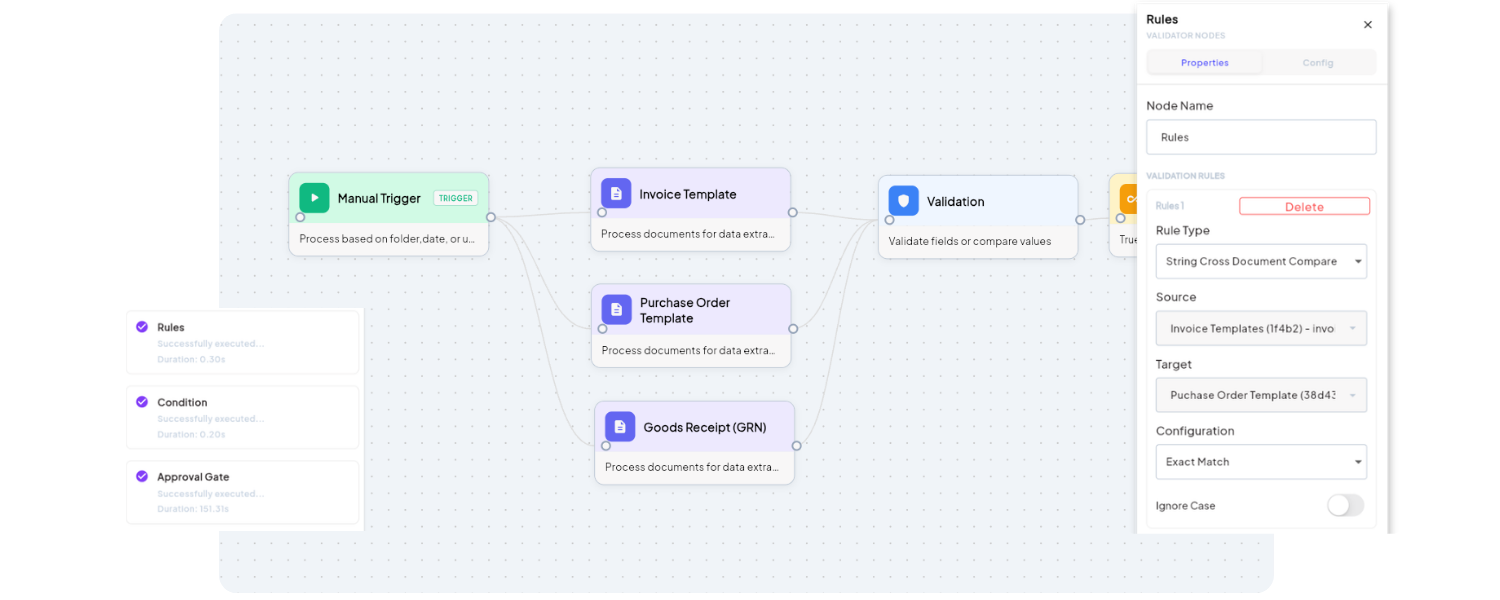
With Fintelite, every document follows the same intelligent workflow:
- AI captures and structures document data
- Configurable validation rules run automatically
- Exceptions are flagged instantly
- Documents are routed for approval
- Validated data is pushed to business systems via API
Experience it firsthand by signing up to our free trial. Try for free
Frequently Asked Questions
Document validation is the process of checking whether a document meets predefined business or regulatory requirements before it is processed. It helps identify missing information, errors, and inconsistencies early in the workflow.
While these terms are closely related, they serve different purposes:
Document validation ensures the document’s data is complete, accurate, and follows business rules.
Document verification confirms the document is authentic and belongs to the claimed person or organization.
Fraud detection identifies signs of tampering, duplication, or suspicious activity.
AI combines OCR with intelligent validation rules to automatically check document data for accuracy, consistency, and compliance. It can validate fields, compare information across related documents, and flag exceptions for review, making validation faster, more accurate, and easier to scale.
Key considerations include document volume, validation requirements, existing workflows, and system integrations. The right solution should support customizable validation rules, seamless API integration, and exception handling for documents that require manual review.
Automated document validation reduces manual effort, speeds up processing, and minimizes costly errors. It also enables organizations to process more documents without increasing operational costs, improving both efficiency and scalability over time.
