


Invoice reconciliation is the process of matching invoice details, such as amounts, vendor information, and line items, against purchase orders and receiving records to confirm everything is accurate before any payment is made. Traditionally, this means manually cross-checking each invoice, tracking down missing documents, and resolving mismatches. However, this approach can quickly become a bottleneck at scale, preventing FinOps teams from working efficiently.
This is why automating invoice reconciliation has become essential for growing businesses, and Fintelite might be just the tool you’re looking for.
What Is Invoice Reconciliation?
As a core function within accounts payable, invoice reconciliation sits between the receipt of a supplier’s invoice and the release of payment. Its purpose is to confirm that what is being billed accurately reflects what was ordered and received.
Every time an invoice is received, reconciliation is used to:
- Match the invoice against the purchase order and receiving records
- Verify that quantities, amounts, and pricing align with the agreed terms
- Cross-check vendor details to confirm the invoice is legitimate
- Flag any discrepancies, such as overcharges, duplicates, or mismatches
- Approve clean, validated invoice for payment
- Record the transaction accurately in the ledger
By conducting these steps, businesses can prevent losses due to overpayments, whether caused by pricing errors or unauthorized charges.
How Invoice Reconciliation Applies Across Business Sectors
While the underlying goal stays the same, the way invoice reconciliation is applied can vary by industry. Differences in transaction volume, complexity, and compliance requirements often influence how teams handle the process in practice.
Retail
Retail businesses often manage frequent inventory restocks across multiple locations, which means a high volume of invoices moving through the system regularly. Reconciliation typically involves matching supplier invoices against purchase orders, verifying that unit costs and quantities align with what was actually received in-store or at the warehouse.
Manufacturing
Manufacturers source raw materials and components from a wide network of suppliers. Reconciliation in this setting helps confirm that invoiced quantities match delivery records and that pricing remains consistent with long-term supplier contracts.
Healthcare
In healthcare, reconciliation checks that invoices for medical supplies, equipment, and services align with procurement approvals. With multiple departments ordering supplies independently, this process helps keep spending accurate and properly accounted for.
Supply Chain & Logistics
Invoices in supply chain and logistics are often tied to variable costs, such as freight, warehousing, and fulfillment services. Reconciliation verifies that billed charges correspond to agreed rates and the service levels actually delivered.
Want to speed up extracting and reviewing invoices across POs and receipts? See how you can bulk automate invoice reconciliation with Fintelite. Book a demo
Common Challenges in Invoice Reconciliation
Manual reconciliation puts a lot of pressure on accuracy, especially as invoice volume grows. Here are several challenges that often occur when handling invoice reconciliation routinely.
Data Entry Errors
Manual data entry is highly susceptible to typos, misread amounts, which can lead to incorrect payments.
High Workload
With the growing volume of invoices, reconciliation demands more time and manpower, pulling finance teams away from higher-value work.
Inconsistent Accuracy
Manual checks are prone to error, as review quality shifts from person to person and tends to decline over long hours due to fatigue.
Delayed Approvals
Invoices are often routed through physical paperwork, email, or disconnected spreadsheets. This leaves approvals dependent on manual follow-up, often leading to days-long waits.
How to Automate Invoice Reconciliation
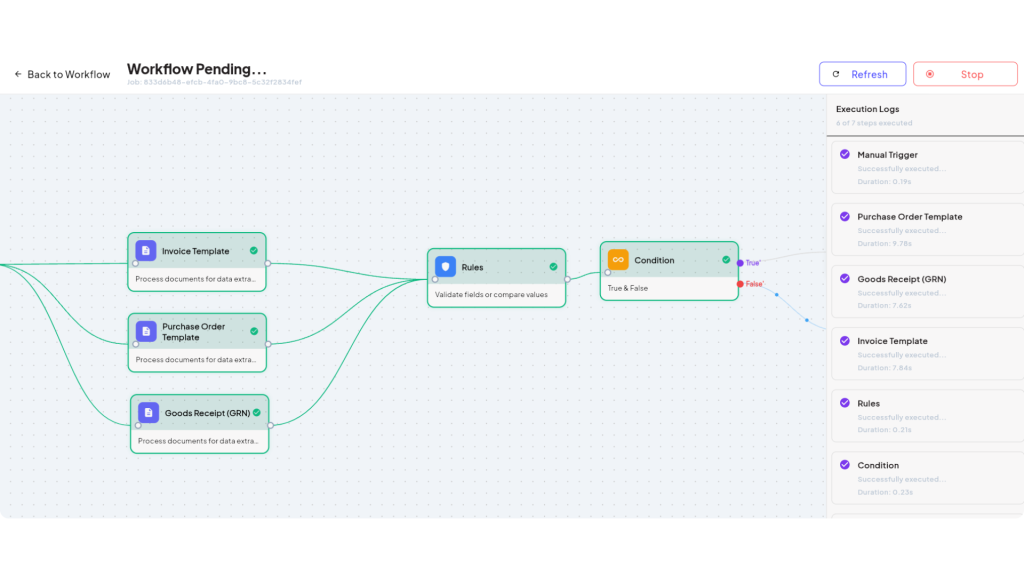
The repetitive process of manually matching invoices quietly drains your time and resources. It’s time to automate invoice reconciliation, and it’s easier than it sounds. With Fintelite, teams can build a workflow that extracts, matches, and validates invoices automatically based on your specific rules, with human-in-the-loop review where it matters. Here’s how to set it up.
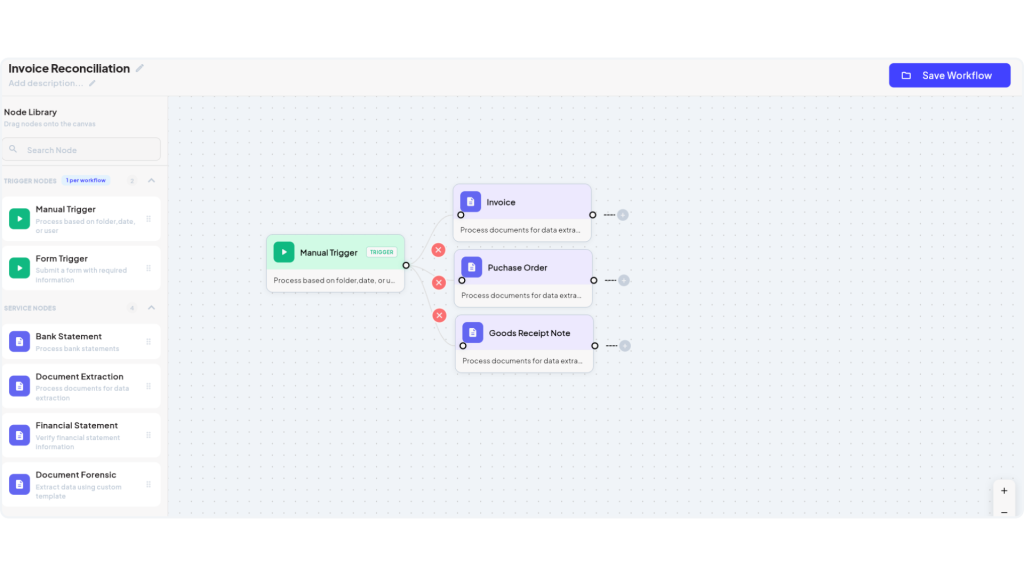
1. Choose the Required Document
Set the workflow to begin by uploading all required documents, such as an invoice, receipt, purchase order, or other records you want to include as part of the reconciliation process.
2. Define Extraction Fields
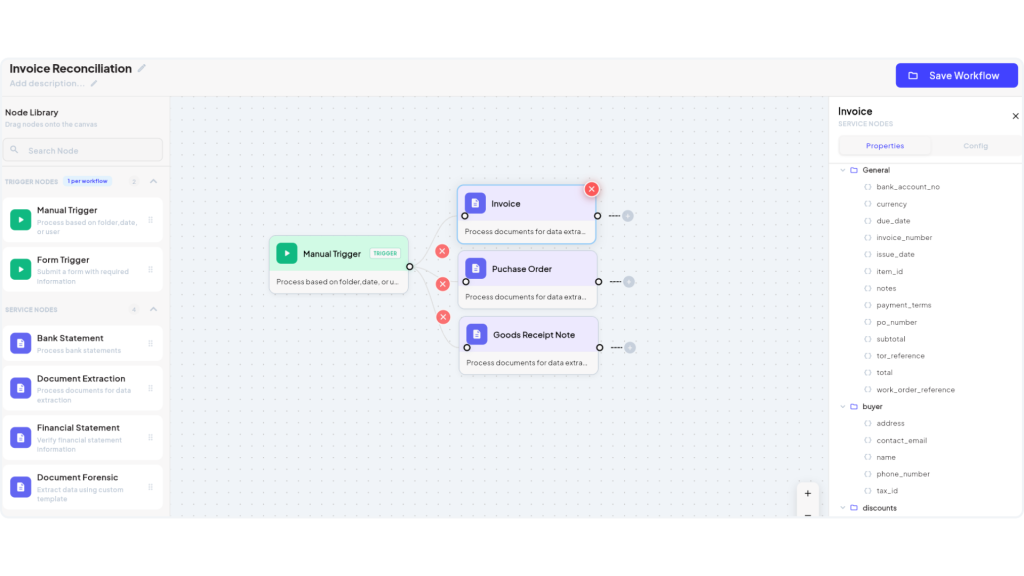
Fintelite’s AI OCR extracts every key field from any document type by default. But, you can also customize specific fields to extract, such as vendor name, invoice number, amount, quantities, and payment terms.
3. Tailor Your Validation Rules
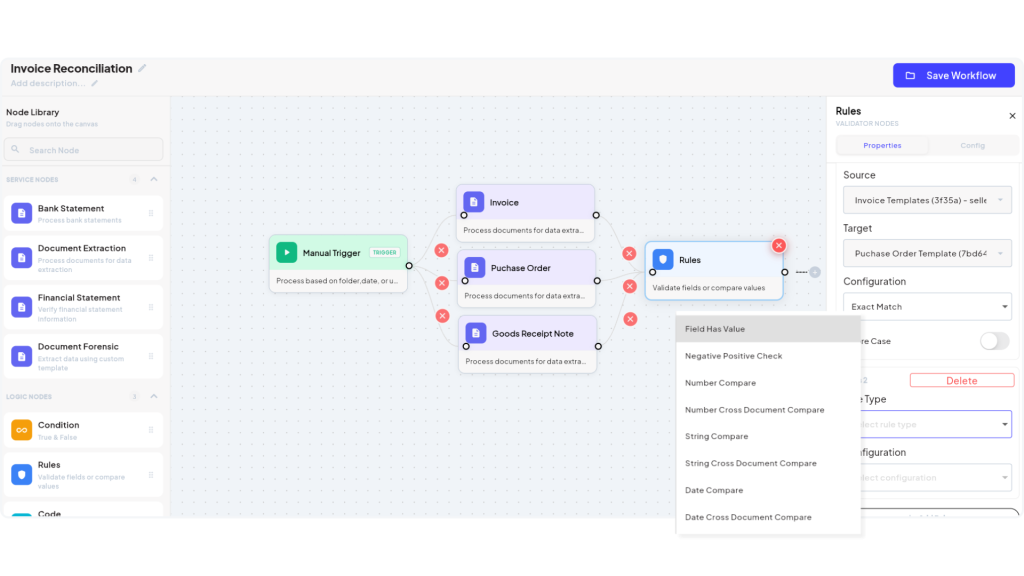
Set rules to check extracted invoice data against purchase orders and receiving records, such as acceptable price variance, quantity thresholds, or required field checks. From cross-document validation to field-existence checks, all easily configurable without code.
4. Establish Approval Routing
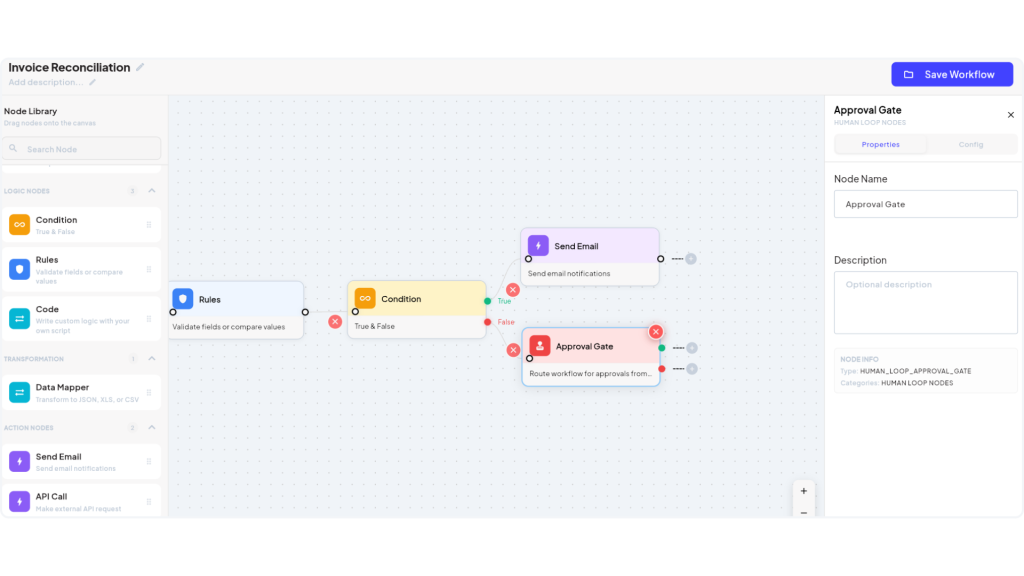
Decide when human-in-the-loop review is necessary, such as for mismatches or amounts exceeding a set limit, and route those exceptions to the right approver. For validated results, choose whether they still need a final approval gate or can move straight to export.
5. Publish & Run the Workflow
Once configured, publish the workflow to start running it advanced automatically. From that point on, invoices are processed end-to-end, pausing only when human review is triggered.
Benefits of Automating Invoice Reconciliation
Moving reconciliation away from manual checks brings advantages. Here’s what you can expect from automating.
Significant Time Savings
Extraction, matching, and validation happen automatically in minutes, saving hours of manual efforts.
Same-Day Approvals
With flagged exceptions routed straight to the right reviewer, approvals no longer sit waiting in email threads. Most invoices can move from received to approved within the same day.
Reduced Risk of Duplicate or Overpayments
Consistent validation rules automatically catch duplicate invoices and mismatched amounts. This prevents money from going out the door for something that was never owed.
Scales Seamlessly Without Hiring
As transaction volume grows, the workflow keeps pace without requiring additional headcount. Reconciliation stays consistent whether you’re processing dozens or thousands of invoices a month.
[FAQs] More About Invoice Reconciliation
Invoice reconciliation is the process of matching invoice details against purchase orders and receiving records to confirm accuracy before payment.
Most of the process can be automated, though human-in-the-loop review is important for exception handling when invoices contain discrepancies, missing documents, or values that fall outside expected thresholds.
Mismatched invoices are automatically flagged and routed to the right team member for manual review before payment is released.
No, automation can scale to fit both small teams and high-volume finance operations, making it just as useful for growing businesses as it is for larger ones.
