


Human-in-the-loop (HITL) is a hybrid approach that combines automated processing with human oversight to review and approve outputs at critical decision points. In document workflow automation, this means data is extracted and processed automatically, but specific fields, such as low-confidence results or exceptions, are flagged for manual verification before moving downstream.
According to B2BDaily, integrating human oversight into AI workflows boosts decision-making accuracy by 31% on average. Most document processing platforms today offer this as a built-in option. This gives businesses the flexibility to decide when automation should run independently and when human input is needed.
Human-in-the-Loop vs Full Automation
When automating document workflows, one important factor to decide is whether the process should include human-in-the-loop review or run fully automated. The answer depends on document consistency, data sensitivity, and the business’s risk tolerance. To better understand where each approach fits, here is a side-by-side comparison:
| Feature | Human-in-the-Loop (HITL) | Fully Automated Processing |
| How it works | Automation processes data, humans review flagged or exception cases | Automation processes data end-to-end without manual review |
| Best for | Sensitive, variable, or high-risk documents | Standardized, low-volume, low-risk documents |
| Accuracy | Higher, since low-confidence results are verified before moving forward | Depends on data quality and system confidence thresholds |
| Risk of Error | Lower, since exceptions are caught before processing continues | Higher, since no manual checkpoint exists |
| Scalability | Scales well, though volume of exceptions can affect review workload | Scales easily since no manual step is involved |
| Compliance Fit | Better suited for regulated industries requiring human sign-off | May require additional controls to meet compliance standards |
Why HITL Matters in Automated Document Processing
The best automation results come from pairing consistent machine processing with human judgment where it matters most. HITL is especially important for exception handling, such as low-confidence extractions, missing fields, mismatched totals, or unreadable handwriting, where human input adds the context automation needs to move forward accurately. When these exceptions occur, HITL typically supports actions like:
- Reviewing flagged data before it moves further into the workflow
- Approving outputs that meet expected accuracy and validation rules
- Rejecting or correcting values that are inaccurate or misread
- Escalating unresolved cases for further manual handling
This checkpoint happens before data reaches downstream systems, such as ERP or accounting platforms, so only verified information moves forward.
How to Add HITL to Document Workflow Automation
With the right automation tools, an entire document workflow with human-in-the-loop checkpoints can be set up in minutes. Fintelite provides a workflow builder that allows teams to build end-to-end document processing fully drag-and-drop, no code required. This is especially useful for administrative teams that want to automate repetitive paperwork, so document processing steps and human review actions can be connected in just a few clicks to form a fully working automated workflow.
1. Choose Starting Point
Set the workflow to begin when a document is uploaded, whether manually, via email, or through an integrated system.
2. Define Extraction
Select the document type, such as invoices, receipts, or purchase orders, and customize which data to extract, such as only extracting vendor name, invoice number, or total amount.
3. Set Validation Rules
Add rules to check the extracted data automatically, such as cross-document validation, required field checks, or amount range and limit checks.
4. Add Conditional Human-in-the-Loop
Set conditions that determine when human review is triggered, such as failed validation, missing fields, or amounts exceeding a set limit. Flagged documents are routed to a reviewer, while clean results continue automatically.
5. Publish and Run the Workflow
Once configured, the workflow can be used anytime to process documents end-to-end. It runs automatically and pauses only when human input is needed.
Use Case Examples
Workflow automation combined with HITL works best for automating operational documents that can’t afford delays, especially when they directly affect payments, vendor relationships, or purchasing decisions. This pairing keeps processing fast while still confirming accuracy before data moves forward. Here are common ways of how this approach is applied in real business operations.
Accounts Payable
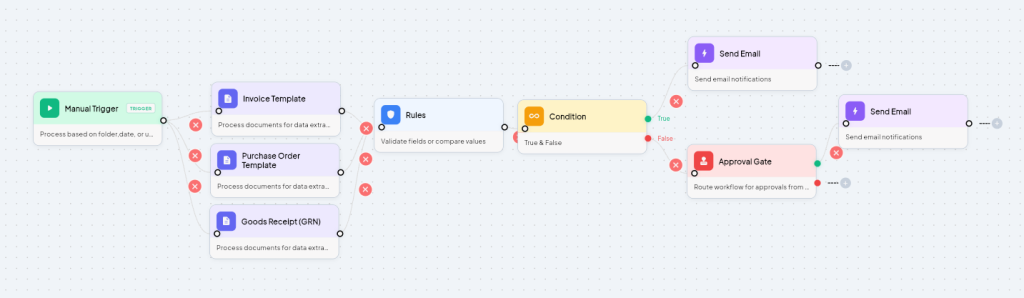
The system automatically extracts invoice data and matches it against purchase orders and receiving records to check consistency. When it finds a discrepancy, a human reviewer steps in to verify the invoice and either approve or correct it before payment is released.
Supplier Onboarding
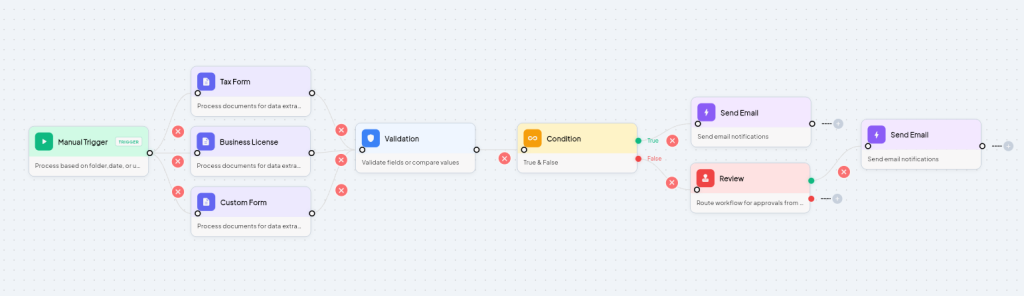
New vendor documents, such as tax forms, business licenses, and bank details, are processed automatically. Human-in-the-loop review is triggered whenever a document is incomplete, expired, or fails a compliance check, ensuring only verified suppliers move downstream.
Credit Risk Verification
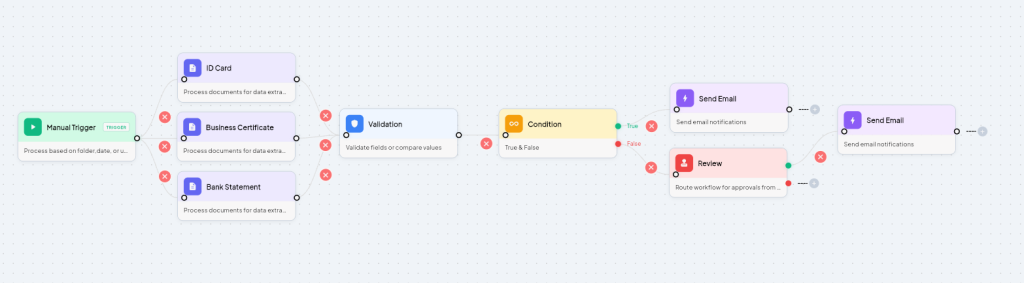
All required documents, such as bank statements, business certificates, and ID cards, are pulled together and screened against risk criteria automatically. A credit analyst takes control of any borderline or inconsistent application, reviewing it before a decision is issued.
Frequently Asked Questions
Yes. When a document is flagged for review, the reviewer can approve, correct, or reject it before it moves further into the workflow. Rejected documents are typically routed back for correction or resubmission, depending on how the workflow is configured.
Yes, a single document workflow can include more than one HITL checkpoint, such as one after data extraction and another before final approval. This is common in processes with multiple stages, like procurement, where different checks apply at different points.
Not significantly. The most effective approach is to route only flagged or exception cases for review, while the rest of the workflow continues automatically. HITL adds a review step only where it’s actually needed, rather than across the entire process.
HITL doesn’t necessarily add significant cost, since only exception cases require manual review while the rest of the process remains automated. Costs mainly come from the time reviewers spend on flagged cases, which is usually a small percentage of total volume.
