


You must already know how draining and time-consuming it is to manually enter receipt details into spreadsheets or systems. With the right automation tool, managing receipts becomes simpler than ever. Tasks that used to take you hours now take only a few clicks to complete.
At Fintelite, we have built an AI-powered OCR tool that enables you to automate data capture from every receipt you need to process. One thing is for sure: this way is much faster and easier compared to manual data entry.
This guide will show you how to automatically extract data from receipts and explain why many teams are switching to Fintelite AI OCR as their go-to tool.
How AI OCR Can Help
OCR, short for Optical Character Recognition, is a technology that transforms text from images and documents into clean, structured data. In simple terms, OCR makes information fully editable and actionable, allowing you to input or process it seamlessly across systems. Integrating OCR means you can significantly reduce the need for manual data entry, as data is captured automatically in seconds. For receipt handling, this technology is especially beneficial for expense tracking and management, enabling faster journal data entry.
Receipt Data That Can Be Extracted With AI OCR
Receipts are transactional documents that include details of a purchase. They serve as proof of payment and are commonly used for expense tracking, reimbursement, accounting, and financial reporting purposes.
With Fintelite AI OCR, all receipt data fields are automatically captured by default. But customized data capture can be easily configured beforehand so your team gets exactly the information it needs. Below are the common line items and data fields that can be extracted from receipts using OCR.
Main Receipt Fields:
- Merchant name
- Receipt number
- Subtotal
- Tax
- Admin charges
- Grand total
- Payment amount
- Change
Line Item Details:
- Item name
- Quantity
- Unit price
- Total price per item
Ways to Extract Receipt Data With AI OCR
With Fintelite AI OCR, extracting data from receipts doesn’t have to be painful. Here’s how you can do it easily:
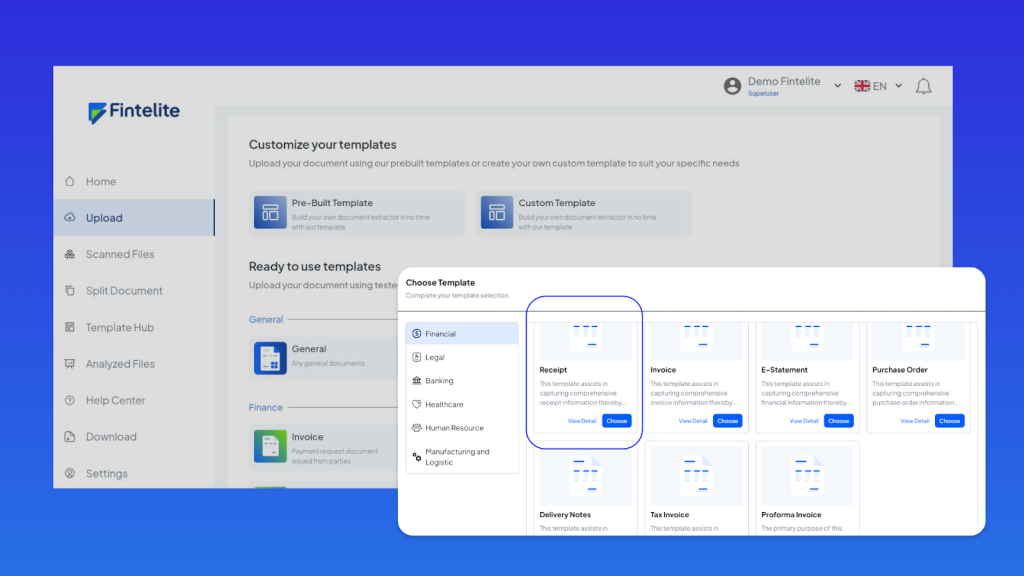
Step 1
Once you enter our dashboard, you will find a pre-built receipt template ready to use. You have full control to use it immediately or customize it if required, ensuring it aligns with your specific needs.
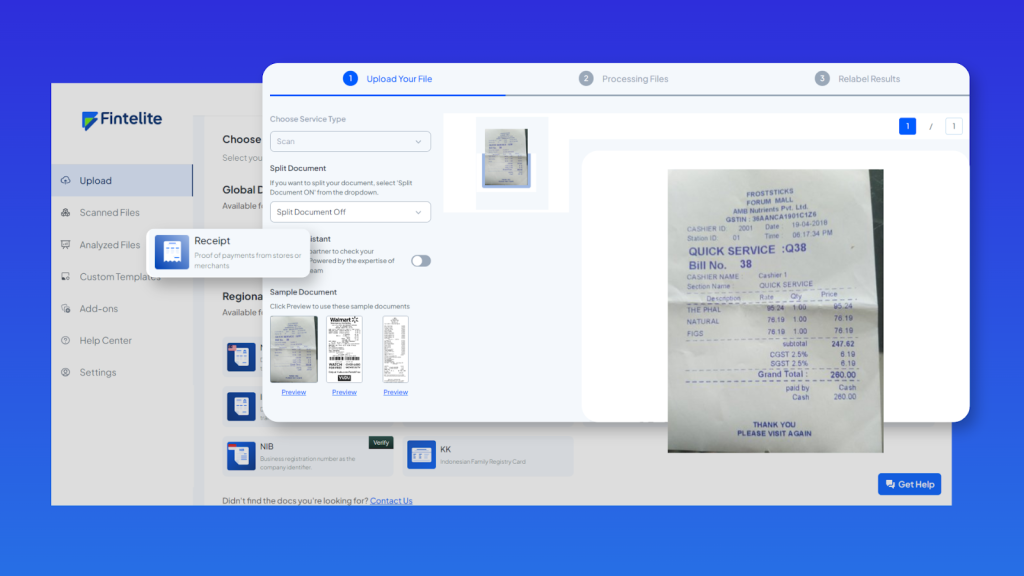
Step 2
Then, submit the receipts you have. Fintelite supports input in various formats, including scanned images and PDF files.
Step 3
The AI OCR automatically reads and extracts key data such as merchant name, date, total amount, tax, and line items based on the configuration you applied.
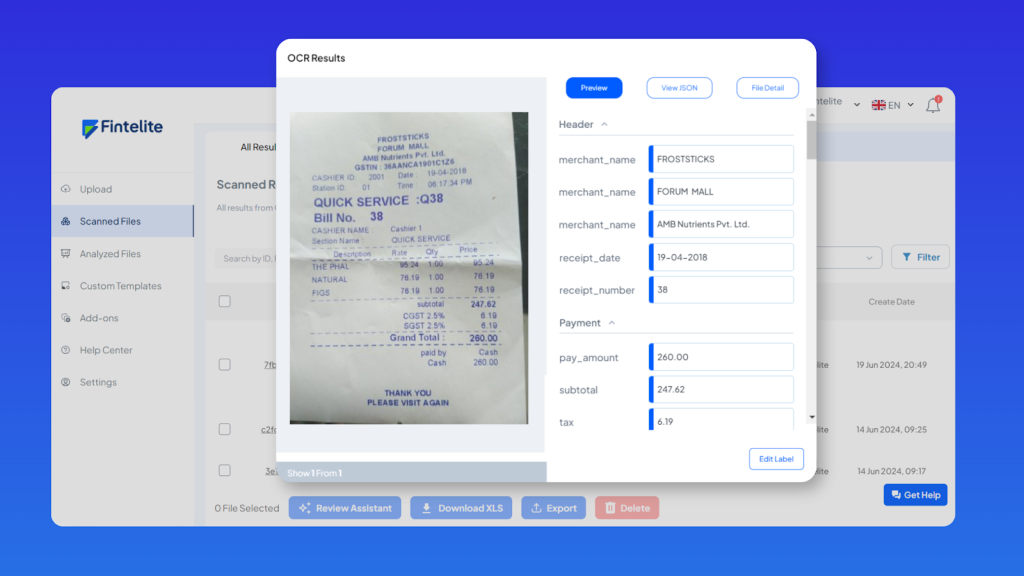
Step 4
In seconds, the structured data will be available for you to review, export in your preferred format, or integrate directly into your existing systems and applications.
Book a session to see it in action and claim your free access.
Frequently Asked Questions
To help you get started, here are a few more important things to know about extracting data from receipts with Fintelite AI OCR.
FAQ 1
How accurate is data extraction from receipts using Fintelite AI OCR?
A: Fintelite AI OCR intelligently captures data from receipts in various formats, whether uploaded as scanned images or PDFs. Moreover, the AI engine continuously refines its recognition accuracy as more documents are processed, ensuring dependable results every time.
FAQ 2
How easy is it to create custom data extraction rules?
A: Simply define specific data fields you want to extract with a quick setup, 100% no code. Build your own custom AI OCR model to match your current system templates and reporting requirements effortlessly.
FAQ 3
Is it efficient for handling large volumes of receipts?
A: Yes. Fintelite AI OCR is an enterprise-grade solution trained to process receipts in bulk with consistent and reliable accuracy. This makes it especially ideal for companies looking to streamline large-scale expense claims, retail transactions, or financial reconciliation processes.
