
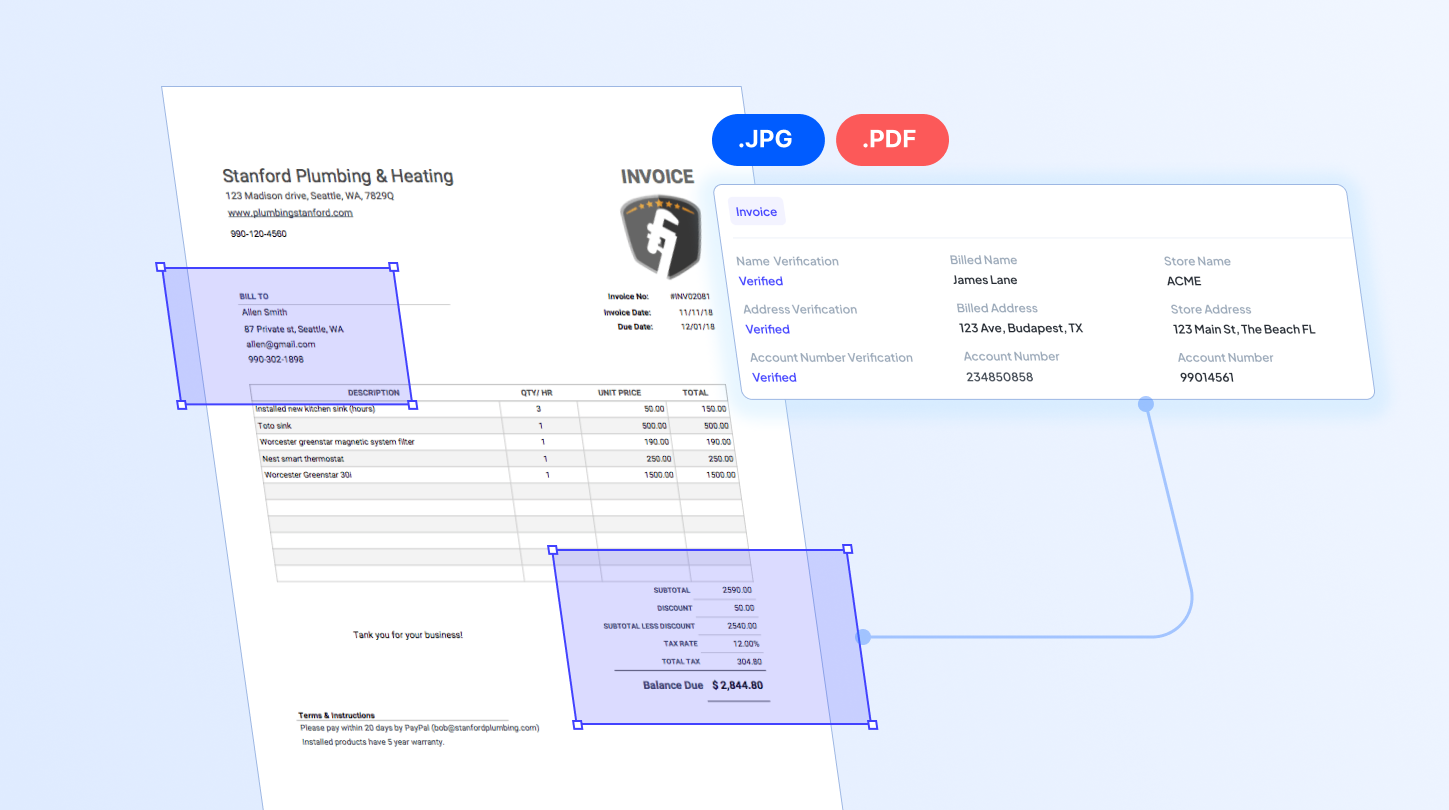

Schema-based data extraction is a method of automatically pulling and mapping specific information from documents into a predefined format. The system knows in advance what to look for and how to structure the output, rather than scanning a document freely. As a result, extracted data remains consistent and accurate, even as document layouts or field labels vary from one file to the next.
That said, schema-based extraction is especially useful when feeding data into systems that require strict formatting, such as dates, line items, or reference numbers, where consistency directly affects downstream accuracy.
Schema-Based Extraction vs Zonal-Based Extraction
What’s the difference between schema-based and zonal-based extraction? Zonal-based extraction pulls data from fixed coordinates on a page, while schema-based extraction identifies data by field type and context, not position. Understanding the key differentiators between the two helps you decide which method fits your document workflow best.
| Feature | Schema-Based Extraction | Zonal-Based Extraction |
| How it works | Identifies data by field type and context | Extracts data from predefined coordinates on the page |
| Best for | Documents with varying layouts, such as invoices from different vendors | Documents with a fixed, unchanging layout |
| Flexibility | Adapts to layout changes without reconfiguration | Requires manual reconfiguration if the layout shifts |
| Setup | Define a schema once, reuse across similar document types | Define zones for each unique document layout |
| Error Risk | Lower risk when documents vary in format | Higher risk of errors if fields shift position |
| Scalability | Scales well across multiple vendors or formats | Best suited for high-volume, single-format documents |
How Schema-Based Data Extraction Works
Behind the scenes, schema-based extraction follows a consistent sequence Here’s the step-by-step process of how it typically works:
1. Ingest Document
Upload the document, and the system will automatically detect and process it, whether it’s a PDF, scanned image, or digital file.
2. Extract Relevant Fields
The system scans the content to extract the specific fields defined in the schema, such as invoice number, vendor name, or total amount, turning them into machine-readable.
3. Map Extracted Data
Each piece of data is placed into its corresponding field in the schema, converting raw text into structured, labeled information.
4. Validate Data Accuracy
The mapped data is checked against expected formats or rules, such as confirming a date looks like a date or an amount falls within a reasonable range, before it’s considered ready for use.
5. Deliver Structured Data Output
Generate data into a clean, structured format, ready to sync with downstream systems like an ERP, database, or spreadsheet.
Benefits of Schema-Based Extraction
Defining a schema upfront changes how reliably data moves through a workflow. Here’s what businesses typically gain when they use a schema to guide extraction instead of freeform reading.
Higher Data Accuracy
With predefined rules guiding the extraction, results are more precise, less prone to misread or mismatched values, and consistently structured across every document.
Reduced Manual Cleanup
Since the system validates and structures data at the point of extraction, teams spend far less time fixing formatting issues or missing fields.
Scalability
The same schema rules are applied every time a document is processed, so handling more volume doesn’t require rebuilding extraction logic from scratch.
Easier ERP/System Integration
Structured output is delivered in a format that matches your schema. This makes it easy to send it straight to your existing ERPs, databases, or other downstream systems, without additional mapping work.
How to Set Up Schema-Based Extraction with Fintelite
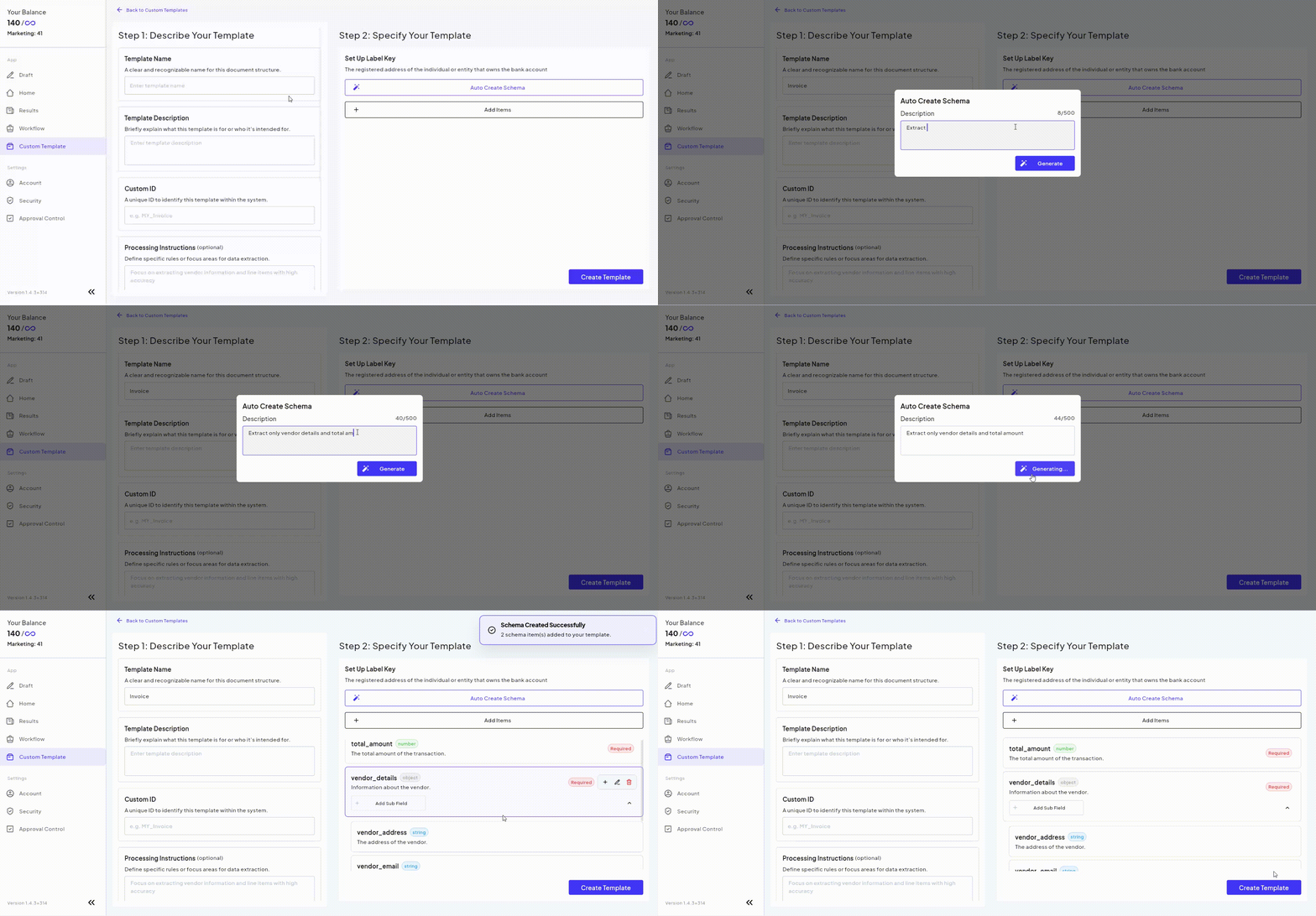
Fintelite makes it easy to tailor document data extraction to your preferred schema, without writing a single line of code. Simply describe the fields you want to extract in natural language, and our AI automatically generates the extraction rules for you.
You can further customize the schema by renaming field labels or adding custom fields to match your business requirements. Once configured, extracted data can be delivered directly to your downstream systems through seamless API integration.
Register to our free trial and unlock access to our features:
- Multi-Layout Extraction: Automatically capture the same fields from different document layouts and return them in a consistent, structured format.
- Custom Field Mapping: Label, organize, and format extracted fields to match your preferred schema.
- Flexible Schema Updates: Modify extraction requirements anytime without rebuilding templates.
Frequently Asked Questions
Schema-based extraction can be applied to a wide range of business documents, including invoices, purchase orders, receipts, bank statements, identity documents, contracts, application forms, and more. As long as the required fields can be defined, the output can be mapped to your preferred schema.
No. Unlike zonal OCR, which relies on predefined extraction zones, AI-powered schema-based extraction identifies fields based on document context. This allows it to extract the same data into your predefined schema even when document layouts different from one file to next.
No. With Fintelite, you simply describe the fields you want to extract in your own words, just like giving an instruction, and the AI will automatically create the extraction rules for you.
Schema-based data extraction is commonly used in document-heavy workflows that require standardized outputs. Typical use cases are invoice processing, accounts payable automation, procurement, customer verification, claims processing, and loan applications. By converting documents into a consistent schema, businesses can automate downstream workflows and integrate data directly into ERP, CRM, and other operational systems.
