


When you look at invoices, purchase orders, and receipts, you will notice that they all follow a similar structure. They present information in a list of individual entries, each detailing a product, quantity, and price. These entries are called line items.
Processing large volumes of these documents often time-consuming, and this is exactly what line item extraction can solve. It enables automated extraction of every row of information, meaning you no longer have to enter them manually. With Document AI, automating line item extraction becomes easy and efficient, even for the most complex document tables.
What Is Line Item Extraction?
By definition, line item extraction is a process of automatically pulling row-by-row data from documents. It is the best method for handling documents with tables, such as invoices, as it keeps the relationship between each field perfectly intact and accurately structured for your internal systems.
The technology behind line item extraction lies in OCR (Optical Character Recognition), which plays a key role in reading and converting line item data from scanned or PDF documents machine-readable format. By automating data extraction at this level of detail, back-office teams can significantly reduce the reliance on manual data entry and save valuable time.
Document Types That Require Line Item Extraction
Line item extraction is perfect for documents that contain table-based information. Here are some of the most common document types businesses process using line item extraction, along with the information that can be extracted from each.
- Invoices: Product descriptions, quantities, unit prices, taxes, discounts, and line totals.
- Purchase Orders: Item names, SKUs, quantities, unit costs, delivery dates, and orer totals.
- Receipts: Purchased items, quantities, prices, taxes, and payment amounts.
- Bank Statements: Transaction dates, descriptions, debit amounts, credit amounts, balances, and reference numbers.
- Bills of Lading: Shipment items, quantities, weights, package details, container numbers, and tracking references.
- Inventory Records: Item names, SKUs, stock quantities, inventory movements, storage locations, and inventory values.
What Sets Line Item Extraction Apart From Basic Parsing
Basic data parsing and line item extraction both have the same goal: turn documents into structured data. However, they differ in the level of detail they capture, the way data is organized, and the use cases they are suited for. See the table below for a side-by-side comparison.
| Feature | Basic Text Parsing | Line Item Extraction |
| Definition | Extracts general structured data (e.g., fields, values) from text or documents | Extracts detailed, repeating entries (e.g., rows in invoices, receipts) |
| Table Structure | Lost, resulting in messy text outputs | Accurately preserved and structured |
| Accuracy | Prone to misreading column alignment | High precision across complex layouts |
| Manual Effort | Requires manual cleanup and re-formatting | Ready-to-use with zero manual work |
| Use Cases | Simple documents, contract, research documents | Invoices, receipts, bills, purchase orders |
Key Benefits of Line Item Extraction
By now, you might understand what line item extraction is, but wonder what its real impact on your business document processing looks like. The good news is that the benefits are wide ranging, delivering both immediate wins and long-term gains, such as:
Faster Data Intake
Simply upload, and get all your data extracted in minutes. With the right tool, you can efficiently process bulk volumes of documents with high speed and accuracy.
Easier Access to Information
All your important data is now digitized and stored in a searchable format. No more digging through stacks of paper documents or cluttered email threads to find a single invoice detail. Everything is just a few clicks away.
Significant Time Savings
Cut a few hours off your to-do list as data extraction is now handled automatically. Reallocate that time and resources to more important things such as strategic planning, vendor relationships, or financial analysis.
Ready to automate data extraction from any document you handle? Try Fintelite for free and experience the difference yourself
Common Challenges of Line Item Extraction
Automating line item extraction proves beneficial, but it also comes with several challenges. Understanding these challenges upfront helps you anticipate any potential issues and choose a solution that can address them effectively.
Poor Image Quality
A slight tilt in scans, blurry photos, or faded text can reduce extraction accuracy. Pre-processing is important to clean and enhance document quality before extraction begins.
Unpredictable Layouts
Documents like invoices or receipts arrive in varying formats depending on the vendor, which can confuse extraction systems that rely on fixed templates. Consider using AI-powered OCR that seamlessly detects fields even when they change in size or placement.
Language Limitations
Businesses operating globally often deal with documents written in multiple languages, yet many extraction tools are optimized for English only. Look for a solution that supports multilingual extraction and can handle varying date or currency formats for accurate results.
How to Automate Line Item Extraction
Many organizations today are turning to a document AI tool to automate line item extraction rather than managing it in-house. With Fintelite, automation is within reach for any business. We’ve simplified complex AI technology so you can start extracting line-item data from any document that slows you down without complex setup. Here’s how simple the automation is:
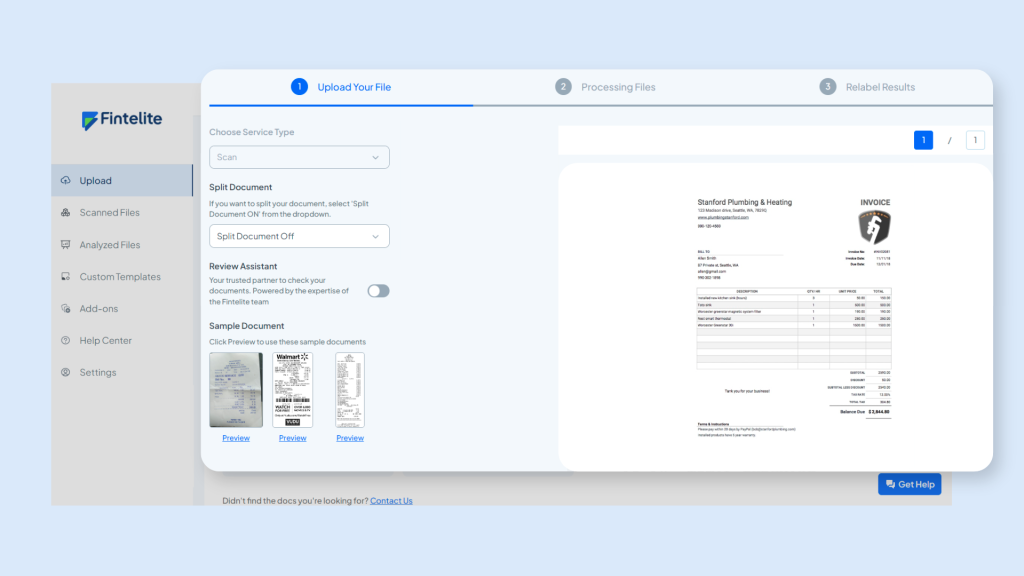
Step 1: Submit your documents
Just drag and drop your files onto the dashboard, or set up an auto-forward from your email straight to the system. Whether it is a PDF, a scanned document, or an image file, Fintelite accepts them all. In this example, we submit an invoice.
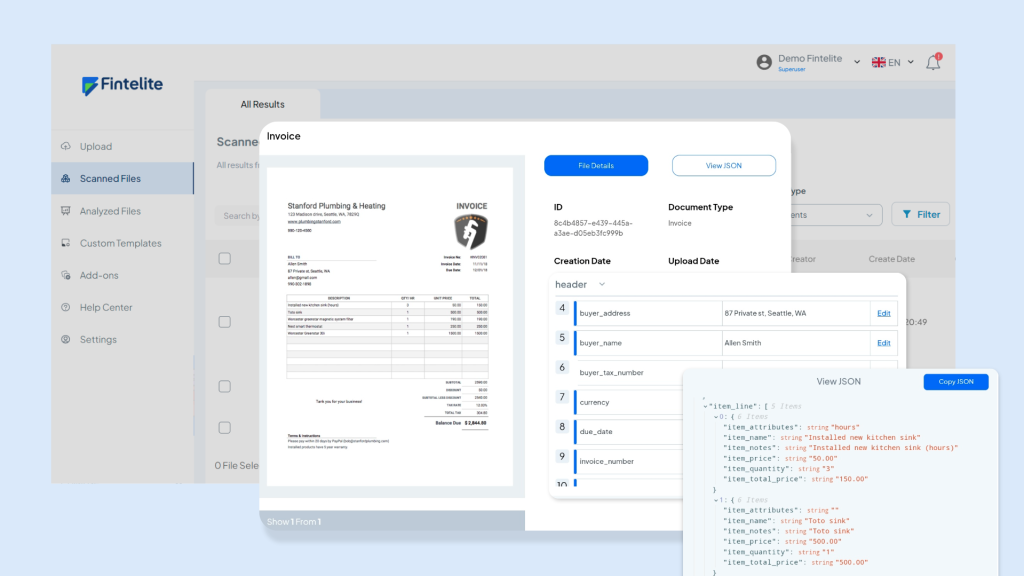
Step 2: AI data extraction
Once uploaded, the embedded AI OCR gets to work. It automatically recognizes flat fields and line items. You have the flexibility to extract the full document or customize the output to focus solely on line items, depending on your needs.
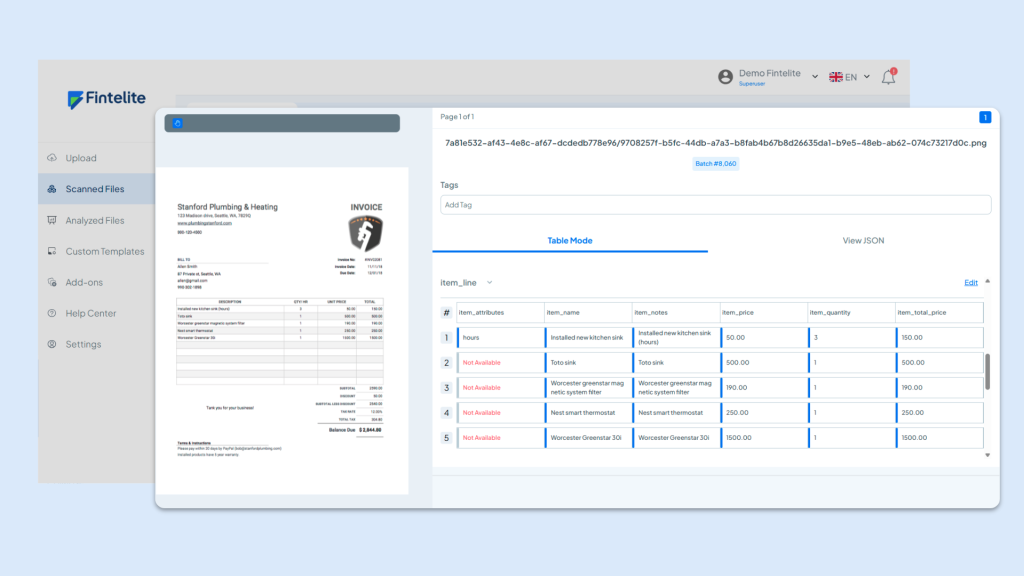
Step 3: Human-in-the-loop review
We know accuracy is everything, so we make it easy for you to double-check the results. You can quickly review the extracted data and make any tiny tweaks if needed, ensuring everything is completely correct before it reaches your system.
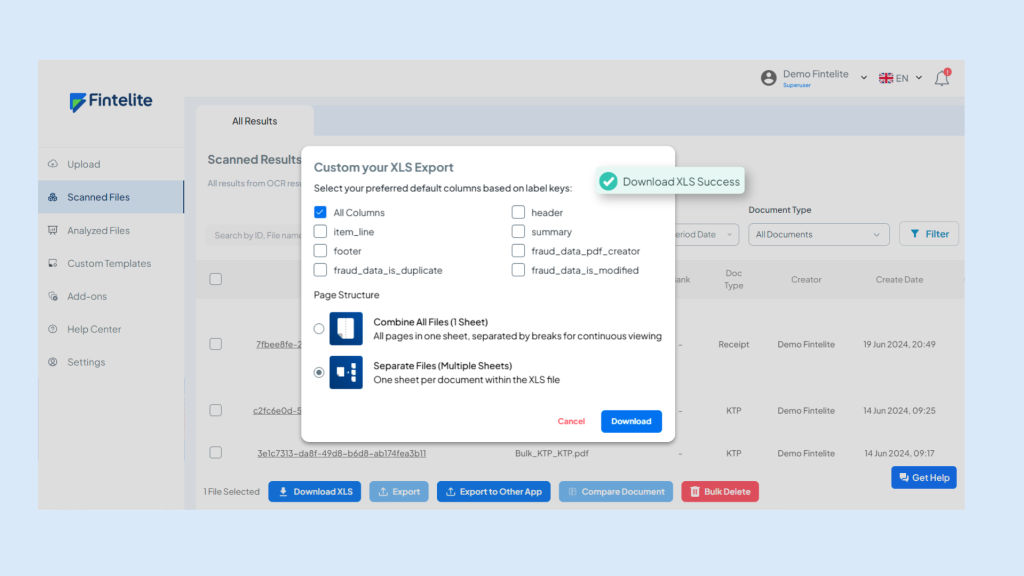
Step 4: Export or integrate
Once you’re satisfied with the results, you can export the data into your preferred format, such as Excel or JSON, or seamlessly integrate it into your existing ERP and favorite apps.
Frequently Asked Questions (FAQs)
Line item extraction is the process of automatically pulling row-by-row data from documents, capturing every individual entry such as product descriptions, quantities, prices, and totals — exactly as they appear in the original document.
Line item extraction works on any document that contains table-based information. Common examples include invoices, purchase orders, receipts, bank statements, bills of lading, and inventory records.
The technology behind line item extraction is OCR (Optical Character Recognition), which reads and converts data from static documents into machine-readable format. AI-powered OCR tools like Fintelite make it easier for business teams to bulk automate line item extraction from hundreds of documents efficiently.
The flexibility to customize line item extraction depends on which tool you use. With the right tool, you can choose to extract the full document or customize the output to focus solely on specific line items, depending on your needs. This gives you full control over what data gets captured and how it is structured.
Once extraction is complete, you can export the data into your preferred format such as Excel or JSON, or integrate it directly into your existing ERP and business applications for a seamless, end-to-end workflow.
