

Tax forms contain critical financial information, but manually collecting that data into business systems can be very time-consuming. A single 1099, W-2, or country-specific tax document can have a dozen fields to enter and review. What’s manageable for a handful of forms becomes a bottleneck across hundreds of tax documents each month. Manual entry, the default for decades, can no longer keep pace.
This is where automated tax form data extraction makes the difference. It enables data from filled tax forms to be pulled directly into your business systems in seconds, without a single manual keystroke. Done right, it significantly cuts costly data-entry errors and saves your team hours of repetitive work.
What Is Tax Form Data Extraction?
Tax form data extraction is the automated process of capturing information from a tax form, row by row, and converting it into structured data that’s fully usable across your digital systems. In simple terms, it replaces manual reading and typing with a system that automatically pull out all required information for you.
Types of Tax Data That Can Be Extracted
Extraction can capture an entire form or target only specific data, depending on what your use case requires. Here are the standard fields extraction tools typically capture:
- Tax identification numbers (TIN/EIN, or local equivalents):
The identifier used to match a form to the correct individual or business, such as an EIN in the US, a VAT number in the EU, or a national tax ID elsewhere. - Wages and compensation:
Income paid to employees or contractors, typically found on payroll forms or income statements. This data feeds directly into payroll reconciliation and income reporting. - Withholding amounts:
Tax already deducted at source, whether by an employer or a payer. Accuracy here affects how much tax liability remains outstanding. - Dividend and interest income:
Earnings from investments or savings, reported separately from wages in most tax systems. - Deductions and adjustments:
Expenses, allowances, or credits that reduce taxable income, commonly found on annual filing schedules.
The Technologies Behind It: AI & OCR
Automated extraction relies on two layers working together: OCR to read the text, and AI/ML to understand the context.
OCR (Optical Character Recognition)
This is the foundational technology to convert static, printed, or handwritten characters into machine-readable text. But it only recognizes characters, not meaning; it can read “45,000” without knowing if that’s a wage or a withholding amount.
Read Also: What Is OCR?
AI & Machine Learning
Layered on top of OCR, AI and machine learning interpret what each extracted value actually means, using position, formatting, and surrounding labels to identify the correct field. This works two ways:
- Template-based extraction:
Trained on a fixed layout; accurate for standardized forms, but breaks when the layout changes. - Template-free extraction:
Understands field meaning regardless of layout, handling new or country-specific forms without retraining.
Most tools also assign a confidence score to each field, flagging low-confidence results for human review instead of pushing them through automatically.
Challenges in Automating Tax Form Data Extraction
Tax forms pack a large number of data fields into a dense, often complex layout, which can be a problem for legacy extraction tools. A few recurring challenges stand out:
Scalability Issues
At high volumes, tax form extraction can slow down or become error-prone, especially when they are vary in layout or come from different issuers.
Formatting Loss
Tables, columns, and field structures can get distorted or lost during scanning or conversion, causing data to be misaligned.
Data Security
Tax forms contain sensitive PII and financial data, so extraction tools need strong encryption, access controls, and compliance support to handle them safely.
How to Automate Tax Form Data Extraction Efficiently
The most efficient approach to automating tax form data extraction is using AI-powered OCR. Consider Fintelite, an advanced data extraction tool built for business teams, with customizable fields through an instant prompt setup so teams can tailor exactly what data to extract. Here’s how it works in practice, using Fintelite as an example platform, step by step.
Try with your own documents for free
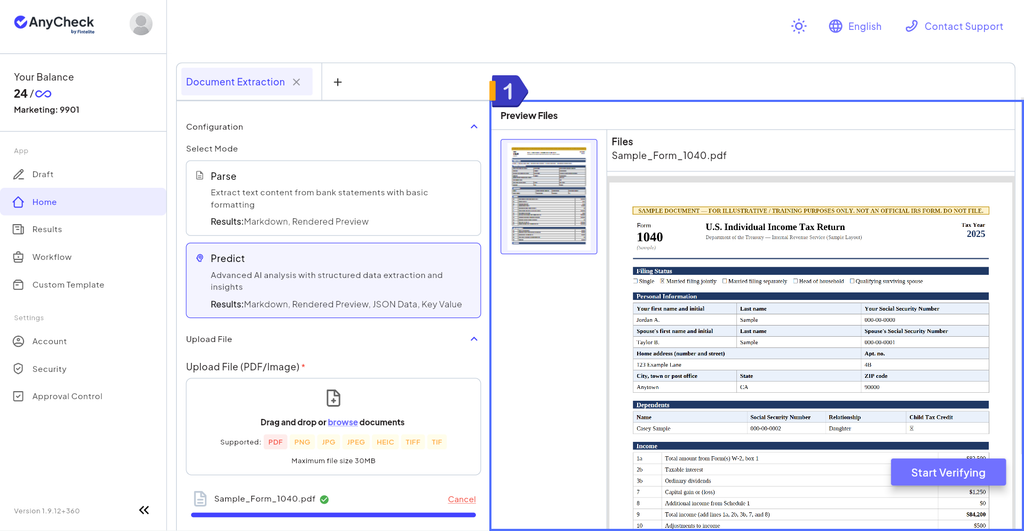
Step 1: Document Upload
Start automating one at a time or in bulk. Fintelite accepts uploads directly, by email, or through a connected folder, so documents don’t have to be gathered manually before processing starts.
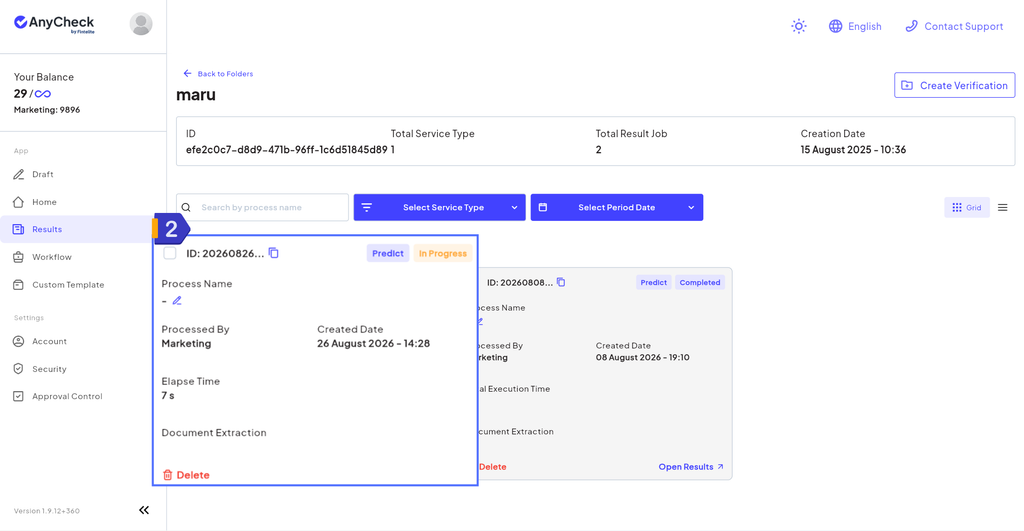
Step 2: Data Extraction
This is where extraction happens. Fintelite automatically pulls out the data you need, such as names, ID numbers, income figures, and withholding amounts, and converts it into a machine-readable format while keeping the original structure between fields intact.
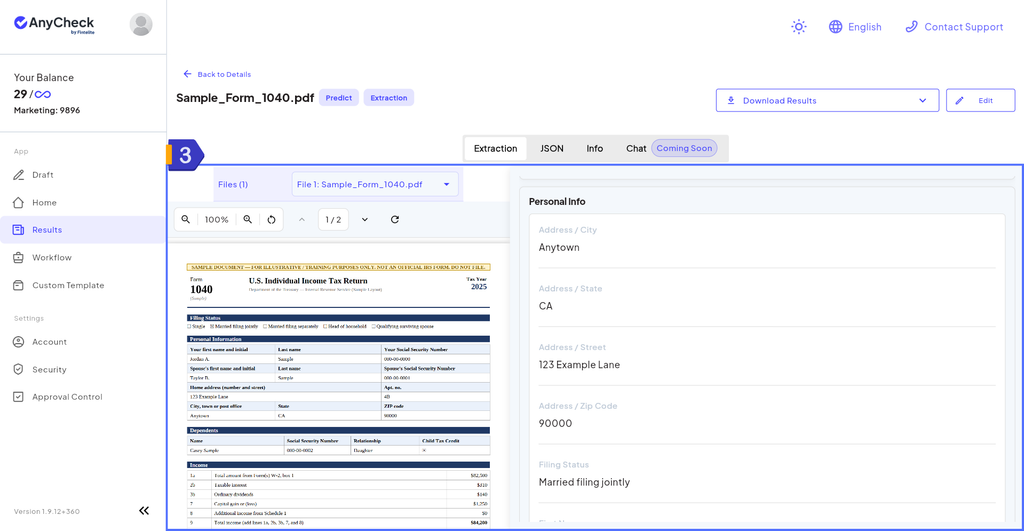
Step 3: Review & Approval
Fields flagged with low confidence are routed for quick human review before being finalized, so every extracted value is verified without requiring manual entry on every field.
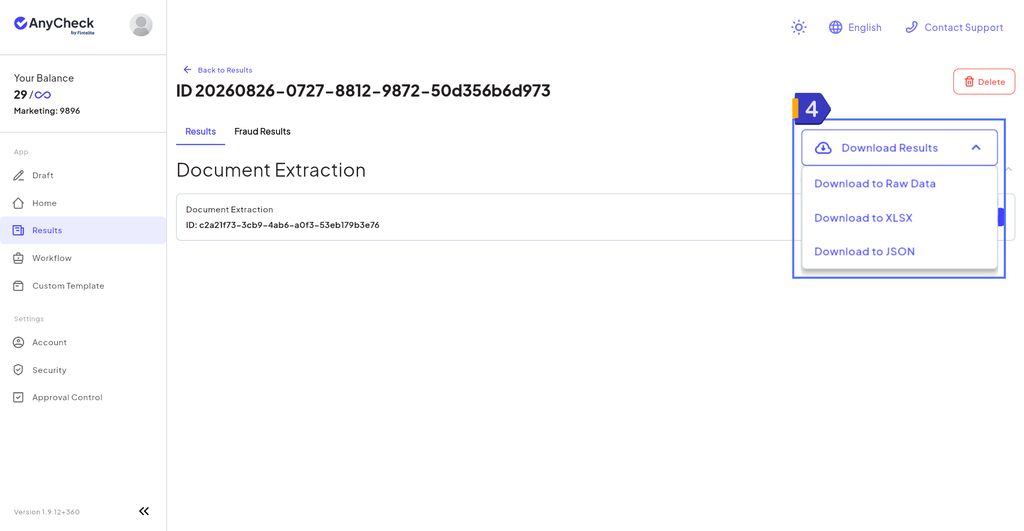
Step 4: Export/Integration
The structured data comes out in a format like JSON or CSV, ready to export or push directly into your linked accounting software, an ERP, or a database.
Where Automated Tax Form Data Extraction Delivers Benefit
Automated extraction shows its value most clearly in the recurring, document-heavy work across finance, HR, and compliance teams. Here’s where it makes the biggest difference:
Vendor & Contractor Onboarding
Manually checking each new vendor’s tax documents for accuracy and ID matches is slow and error-prone. Automated extraction validates data on intake, flagging mismatches before they cause payment or compliance issues.
Year-End Tax Reporting & Reconciliation
Matching payments against filings by hand turns year-end into a seasonal crunch. With records always structured and up to date, year-end isn’t a scramble.
Payroll Processing
Manually entering employee tax elections and generating income statements is repetitive and time-sensitive. Automated capture reduces errors that can delay payroll or trigger corrections.
Audit & Compliance Preparation
Pulling and verifying documents for an audit is time-consuming when records live across systems. Structured, extracted data is already organized and searchable, cutting prep time significantly.
Frequently Asked Questions
For most teams handling more than a handful of forms, yes. Manual entry costs more in time and error-related rework as volume grows, while automation processes forms faster and more consistently, often paying for itself once volume passes a certain threshold.
Most extraction tools can handle common forms like W-2s, 1099s, W-9s, and K-1s, as well as country-specific tax documents, as long as the tool uses template-free AI rather than being limited to fixed layouts.
Look for template-free AI (so it handles varying layouts without manual setup), confidence scoring with human review, support for the form types and volume you need, and easy integration with your existing accounting or ERP systems.
Fintelite offers an AI-powered OCR with customizable field extraction, human-in-the-loop approval, and direct export into accounting software, an ERP, or a database, making it adaptable to different form types and business workflows.
Yes, Fintelite’s template-free extraction isn’t limited to tax documents. It supports data extraction from other structured or semi-structured documents as well.