

In most offices, email remains the go-to way to share documents. Whether it is invoices from vendors or receipts for reimbursement, these documents almost always arrive as email attachments. Normally, this requires you to download, open, and log each file by hand. But with OCR for email attachments, you can skip these manual steps — entirely.
OCR (Optical Character Recognition) makes it a lot faster and easier by automating the data extraction. Simply put, teams can pull the data they need directly from attachments without extra manual effort. From faster data entry to improved accuracy, these changes will boost your work efficiency daily.
What Is OCR for Email Attachments
OCR is a technology that converts unstructured documents into structured data you can easily use digitally. When applied specifically to email attachments, its true value lies in the ability to automate data extraction from any document land in the inbox, meaning no more added time for manual uploads. An integrated OCR will automatically detect and process them, delivering accurately extracted data in your preferred format in seconds.
Why You Need OCR for Email Attachments
Manual data entry works when volume is low, but as your inbox fills, the mounting volume of paperwork becomes overwhelming. OCR is the right solution you need to make daily document processing lighter. Bringing OCR integration to your email workflow benefits your businesses in many ways, such as:
Improved Workforce Efficiency
Manual data entry is a silent productivity killer that forces skilled employees to spend hours on repetitive typing. By automating data extraction at the source, you eliminate this bottleneck, allowing your team to shift their focus toward growth-oriented tasks.
Quicker Access to Critical Data
OCR provides the speed you need by pulling data from email attachments as soon as they arrive. With data ready instantly, your team can jump straight to next steps of the process and complete tasks faster.
Higher Data Accuracy
Human fatigue leads to costly errors. Intelligent OCR reading provides the precision manual entry can’t match, ensuring your financial and operational data are always accurately updated.
How OCR Fits into Email Workflows
When put into practice, OCR uses a dedicated forwarding address as a high-speed intake point for automated document processing. Let’s look at how this works:
Step 1: Designated Email Gateway
Once you receive an email attachment, simply forward it to a specific address that links to the OCR system and triggers the automation.
Step 2: OCR Data Extraction
The system instantly scans the attachment and applies preprocessing for visual readibility. It identifies all the relevant data and transforms it into a machine-readable format with structure intact.
Step 3: Instant Results
In just seconds, your forwarded attachment is processed and ready for use. OCR delivers processable data that you can easily download or transfer to your existing database systems.
Types of Files That Can Be Extracted by OCR
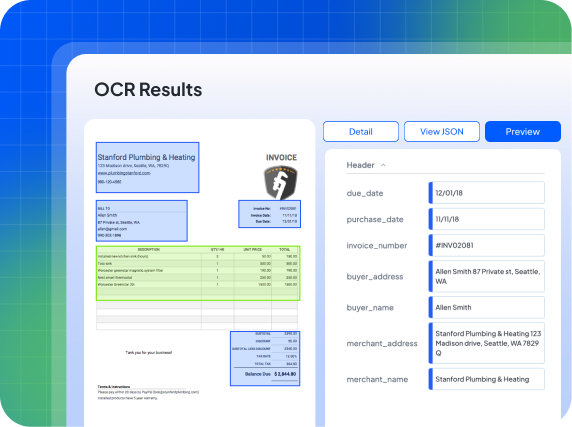
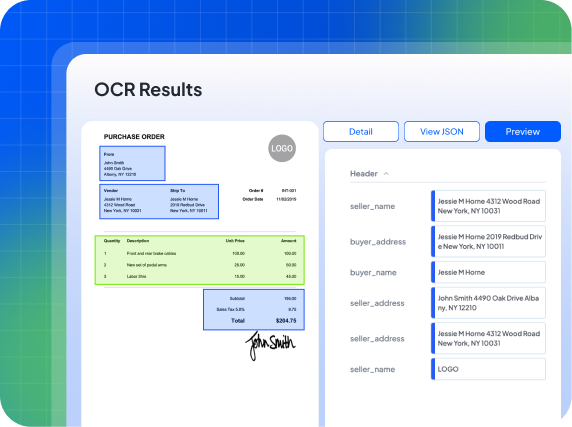
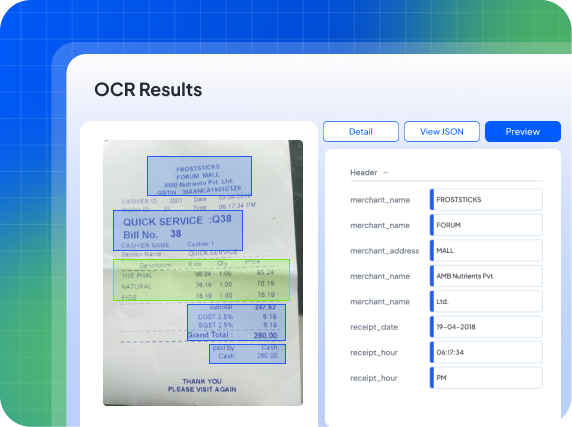
This can be everything, from PDFs, image-based documents, or even grainy scans. Fintelite AI OCR excels here, specialized in multi-format extraction for a variety of documents such invoices, purchases orders, or forms. Here are the extraction results you can expect when using Fintelite AI OCR:
Invoices
Purchase Orders
Receipts
Want to see how it works on your own files?
Fintelite: The Most Efficient Tool to Start Automating
Fintelite AI OCR offers tailored data extraction solutions for businesses of all sizes. With email integration, it gives you a streamlined automation experience by funneling incoming email attachments directly into the processing pipeline. Here’s what sets Fintelite apart:
Template-Less OCR Engine
Even if your documents look different every time, your data won’t. Our AI OCR built template-less, allowing you to extract repeating datasets from multiple layout variations without the bottleneck of manual configuration.
No-Code Custom Data Parsing
Automate specific data extraction with one-time setup. Our AI learns your requirements once and then scales across thousands of documents, ensuring the results are always consistently structured every time.
Intuitive Dashboard
Monitor extraction progress, review outputs, and orchestrate the end-to-end automation workflows from a single, streamlined dashboard.
Email Data Extraction?
