

Documents arrive into a business from many directions—customers, vendors, external parties. Before any of them can move forward, each one has to be reviewed for compliance with what the next step expects. This checking step is document validation. Finance teams do this with invoice reconciliation during the AP process. HR does it with onboarding paperwork. Logistics does it with shipping documents.
The real challenge is not defining what to check, but keeping those checks reliable as volume grows. Human focus simply cannot keep pace as more documents pile up. What begins as a thorough, careful review quickly devolves into fatigue-driven oversight.
This is the moment automating rule-based document validation becomes non-negotiable.
What Is Rule-Based Document Validation?
Rule-based document validation is the automated process of checking incoming files against predefined logical criteria. It transforms manual, error-prone reviews into a fast, standardized workflow.
The process typically unfolds in three key steps.
- OCR tools extract text and key data points from incoming documents.
- The extracted data is evaluated against “if-then” rules, mathematical checks, or cross-document references that have been set up.
- Compliant documents pass directly to downstream systems while failed files are flagged for review.
AnyCheck by Fintelite builds this capability into a no-code automation engine, allowing teams to set up complex extraction and custom verification workflows without waiting for IT. Users can visually define their own validation rules across any document type, and automatically catch anomalies or fraud before data enters core business systems.
How Business Teams Can Benefit From Rule-Based Document Validation
Replacing manual checks with rule-based document validation creates a faster, more dependable operational workflow. Therefore, this shift enables business teams to:
Eliminate human oversight errors
Automated rules apply identical checks every time, catching missing fields, math mismatches, and data anomalies that manual processes are highly prone to missing.
Accelerate processing speeds
Documents pass through conditional logic in seconds instead of sitting in review queues, speeding up approvals and cycle times.
Scale operations effortlessly
Efficiently handles high-volume spikes during peak periodswithout hiring additional staff or straining existing resources.
Stronger Risk & Compliance Control
Every document generates an automated audit trail, making it easier to enforce internal governance and maintain regulatory compliance.
Where Rule-Based Document Validation Is Commonly Applied
Rule-based validation is especially valuable for any document process that must meet a defined standard before moving forward. While specific rules and compliance standards vary from company to company, the most common use cases include:
| Industry / Function | Document Types | Key Validation Checks |
| Accounts Payable & Finance | Invoices, receipts, purchase orders | Matching line-item totals, verifying tax calculations, cross-referencing PO numbers |
| Banking & Financial Services | Loan applications, bank statements, tax forms | Verifying income thresholds, detecting missing signatures, checking document dates |
| HR & Employee Onboarding | Identity cards, passports, resumes, contracts | Verifying ID validity, checking required form fields, validating background details |
| Supply Chain & Logistics | Bills of lading, customs declarations, shipping manifests | Cross-checking weight/volume figures, validating carrier codes, verifying shipping addresses |
| Insurance & Claims | Claim forms, medical bills, damage reports | Validating policy coverage status, checking billing codes, flagging duplicate claim submissions |
5 Steps to Automate Rule-Based Document Validation
Implementing rule-based document validation starts with standardizing your process, including identifying key documents, matching requirements, and exception handling steps. Once you define your process, Fintelite makes it effortless to turn it into a working workflow. With an intuitive visual builder, your team can go from setting up your rules to running them automatically on the very same day. Try for Free!
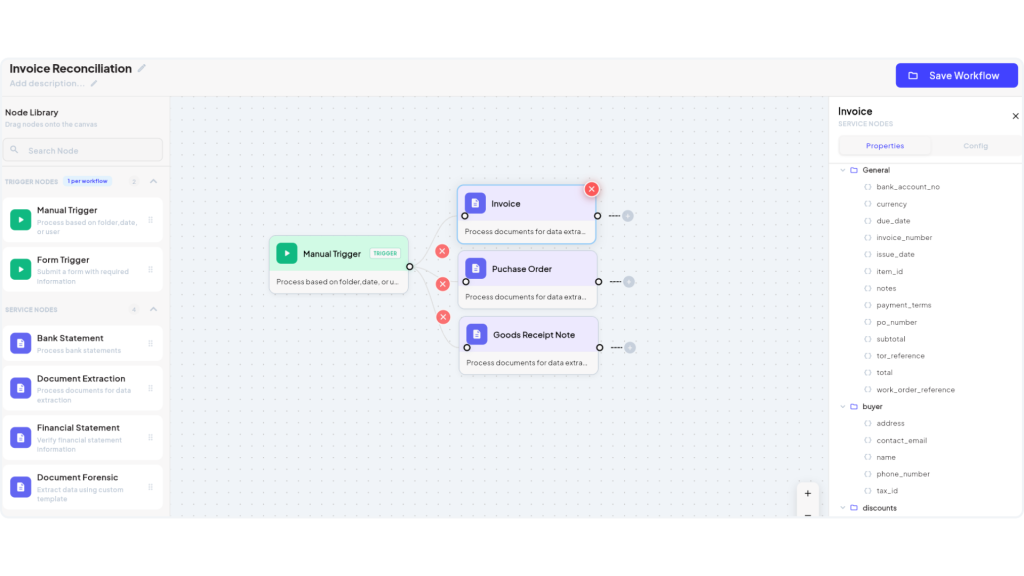
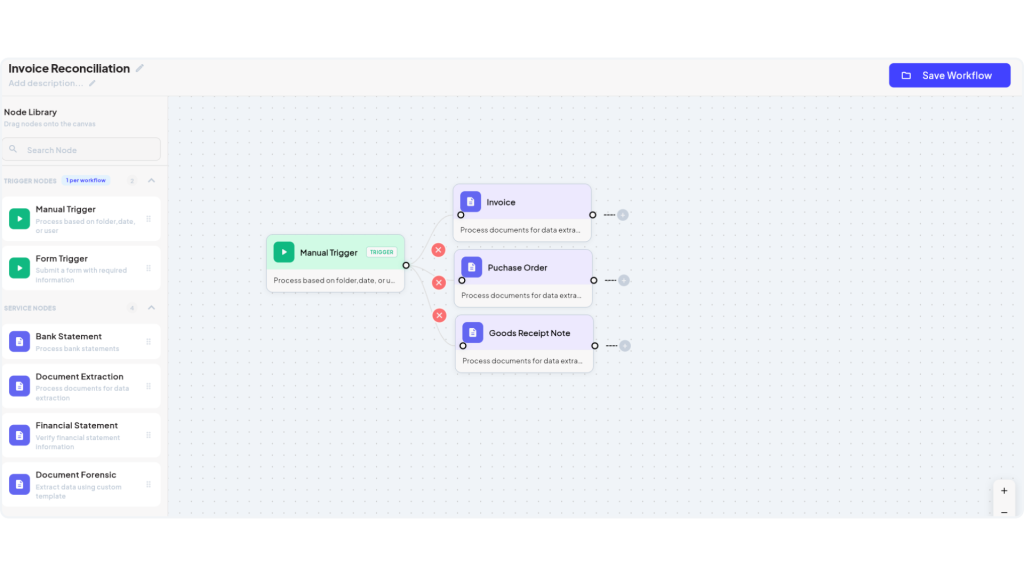
1. Select the Required Document Types
Identify all incoming documents needed for your process. You can evaluate a single file on its own—like a standalone receipt—or set rules that require multiple related documents together, such as an invoice against a purchase order and delivery note.
2. Define Your Validation Rules
Then, set the logical conditions every document must satisfy. These can range from field-level checks (like required fields or value ranges) to cross-document rules (like matching invoice totals to purchase orders within an allowed tolerance).
3. Configure Conditional Routing & Exceptions
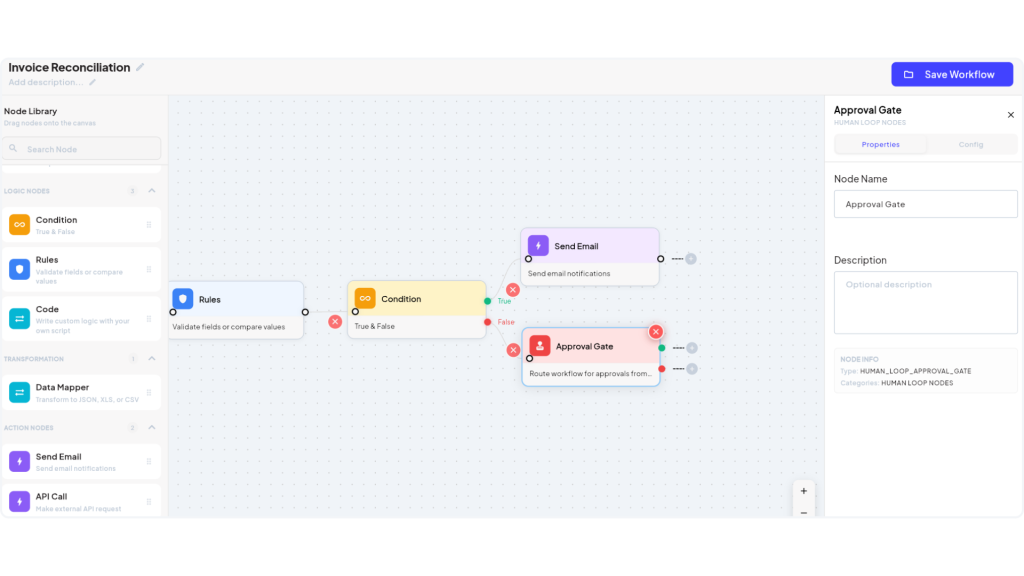
Establish the path documents take based on validation outcomes. If a document fails a check, it can be flagged and routed directly to a reviewer or manager for approval. If it passes, the clean data or approved file can be sent immediately via email notification, exported to a specific format, or pushed to your internal system.
4. Test, Publish & Go Live
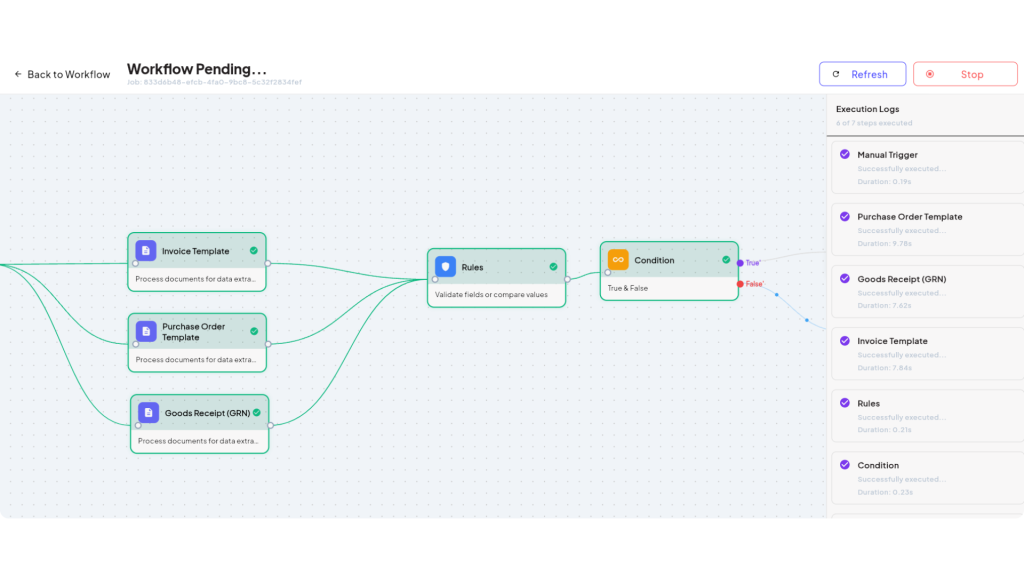
Run test files through your workflow to verify that rules trigger as expected and data routes accurately. Once approved, activate your workflow to process incoming documents automatically and at scale.
Key Takeaways: Standardize, Automate, and Scale
As document volume grows, manual review inevitably creates bottlenecks. Rule-based validation solves this by allowing teams to standardize their operational rules and automate every check into clear, repeatable logic. Whether finance is matching an invoice to a PO, HR confirming onboarding records, or logistics flagging shipping discrepancies, automated rules enforce consistent precision across every incoming file.
Bringing this level of automation to your business shouldn’t require months of technical setup. Fintelite provides the AI-powered solution needed for business teams to automate smart extraction, validation logic, and routing in a single seamless platform. This means less time setting up, full compliance on every check, and more time actually putting clean data to work.
Frequently Asked Questions
Rule-based document validation is an automated process that checks extracted document data against custom business rules before saving or processing it. Companies use it to eliminate human error, enforce strict compliance, and prevent costly mistakes.
Yes. Advanced validation platforms support multi-document cross-validation, such as 2-way or 3-way matching between invoices, purchase orders, and delivery receipts. The system extracts data from related files, compares key fields to ensure consistency, and automatically flags discrepancies before data reaches your primary database.
Yes. Modern rule-based validation systems allow teams to modify, add, or fine-tune rules at any time through intuitive, no-code interfaces. Any adjustments take effect immediately across active workflows without requiring developer support or system downtime.
Setup time depends mostly on how many document types and rules to involve, and platforms requiring custom development can take weeks to go live. With Fintelite, this is different. Set it up yourself through the no-code builder, or have the team configure it for you, and most workflows are live within days.
AnyCheck is an AI-powered Intelligent Document Processing (IDP) platform that automates document extraction, rule-based validation, and workflow routing for business operations.
It is enterprise-ready, featuring end-to-end encryption, ISO 27001 security certification, and flexible deployment options ranging from standard cloud SaaS to dedicated Virtual Private Cloud (VPC) and fully on-premise environments.
You can try by booking a demo on our website or signing up for a free trial to test your sample documents in our no-code builder.