

Almost every AP team comes down to the same problem: invoices pile up faster than people can process them. On average, manual invoice processing costs $10 to $22 per invoice and takes over 9 days to move from receipt to payment-ready. That extra time doesn’t just delay payments, it quietly drains the team’s time and focus from work that actually moves the business forward.
Fortunately, today’s technology has made automating invoice workflow easier than ever. Repetitive tasks like collecting and cross-checking invoice data can now run automatically. This guide walks you through 5 steps to move from manual, tedious invoice processing to an automated process that runs extraction, validation, and data transfer to your ERP in minutes.
How Invoices Are Processed Today
Despite growing digital transformation efforts, many finance teams still rely on largely manual invoice workflows. Whether invoices arrive by email, PDF, paper, or supplier portal, teams often review, enter, verify, and route each document manually before approving payment.
Here’s what that reality typically looks like:
- Invoices arrive from multiple channels. Email, PDFs, and paper invoices all enter through different sources, creating a fragmented intake process.
- Data is entered manually. AP staff re-key invoice details into the ERP or accounting system, increasing the risk of errors.
- Approvals get stuck in email threads. Without a defined routing path, invoices sit waiting for someone to notice, forward, or follow up.
- Invoice data is cross-checked across multiple documents. Teams manually compare invoices against purchase orders, receipts, and business rules to identify discrepancies.
- Invoices are posted, paid, and tracked. Once approved, invoices are recorded in the ERP and scheduled for payment, while their status is often tracked across emails, spreadsheets, or multiple systems.
What Automated Invoice Processing Looks Like
Automated invoice workflow is designed to move invoices from inbox to payment-ready with minimal human intervention. This means automating the routine work that slows down invoice processing, from data extraction, validation, to posting to the ERP system. Here are several key components of an automated invoice lifecycle:
Intelligent data extraction
With AI-powered OCR, turn invoices from PDFs, scans, emails, and digital formats into structured data automatically. Capture supplier details, invoice numbers, dates, amounts, taxes, payment terms, and line items, ready for downstream processing in seconds.
Automated cross-document validation
Run cross-document validation instantly on invoice data against purchase orders, goods receipt notes, or contracts. The system catches mismatches automatically, directing AP teams straight to exceptions that require action.
Workflow and routing automation
Route invoices to the appropriate approvers based on configurable rules, then automatically post approved invoices to your ERP or accounting system. Track every invoice in one centralized workflow with real-time visibility and a complete audit trail.
The 5-Step Framework to Automate Invoice Workflow
Invoice automation works best when it’s built in a specific order, starting with understanding your current process. From there, you can establish the right extraction, validation, and approvals into one workflow that actually works within your needs and existing systems. Here’s the step by step to automate invoice workflow.
Step 1: Understand How Invoices Move Through Your Business
Map your invoice journey from start to finish: where invoices enter, who handles them, and how teams approve them. This helps you build an automated workflow that adapts to how your business already works, instead of forcing changes that create other bottlenecks.
Step 2: Standardize Data and Validation Rules
Inconsistent fields and unwritten rules are what make automation unreliable. Define a standard field set for each invoice type, invoice number, amount, dates, line items. Document the rules behind each type: which documents it needs to match against, what validation rules apply, and when an invoice needs escalation.
Step 3: Set Up Extraction Across Invoices & All Required AP Docs
Configure AI OCR to read and extract data from invoices, purchase orders, receipts, and other supporting documents.
Fintelite’s extraction reads any layout accurately, capturing consistent fields whether the source is a scanned PDF, a photo, or a native digital file, without manual template setup per vendor or document type. Centralizing extraction this way means every document feeds into the same structured format, ready for validation in the next step.
Step 4: Turn Rules Into Automated Checks
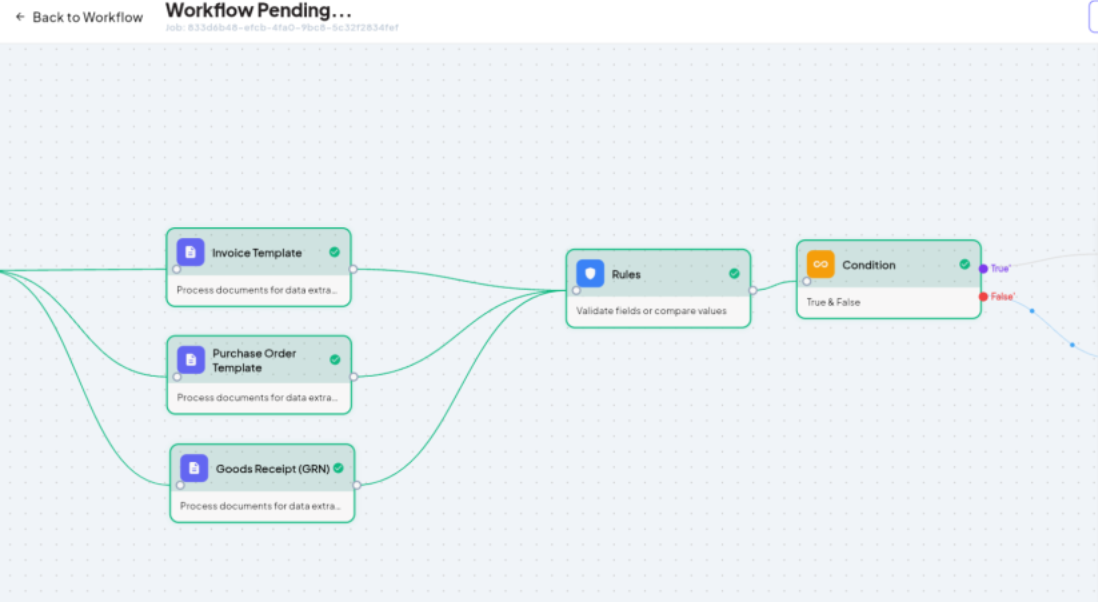
This step puts your business rules into action. With Fintelite, cross-document validation, field checks, and threshold limits all run in one pass, matched against purchase orders and your defined rules. Update variables anytime without code as your processes change, eliminating the manual, line-by-line comparisons that slow AP teams down.
Step 5: Orchestrate Approval and Connect to Your ERP
Route validated invoices to the right approver automatically, with a human-in-the-loop checkpoint for exception handling and final review. Once approved, invoices post directly to your ERP with seamless integration.
How Fintelite Supports Invoice Workflow Automation
Fintelite offers an end-to-end platform that runs the entire invoice process above as one connected pipeline. With built-in AI OCR, our data extraction scales across any invoice layout and transaction document you feed in. Every document can be ingested via direct upload or email, extracted, validated automatically, and tracked visually at every stage, with email notifications sent once processing is complete.
To note, you don’t have to build this from scratch. Fintelite provides a ready-to-use invoice workflow you can adopt right away, and every step stays fully editable, so you can adjust fields, rules, or routing anytime as your process changes. Our team can also help with the entire setup, from configuration to rollout, if you’d rather have it handled for you.
Ready to automate your invoice workflow? Try our no-code builder for free
