

The routine work of manually reconciling purchase orders, invoices, and receipts costs more than it looks like. Each check takes a few minutes, but multiplied across hundreds of transactions and vendors, those minutes turn into hours, and those hours turn into delayed approvals and missed discrepancies.
Automating this process puts an end to that. Today, making the switch from manual to automated reconciliation no longer has to be a complicated setup. This guide will show you the easy way, step by step.
What Is Procurement Reconciliation?
Procurement reconciliation is the process of comparing purchase orders, invoices, and receipts against each other to confirm a transaction is accurate before payment is approved. It connects procurement and finance, serving as the last checkpoint before payment is released. The scope of validation can vary by business, but at minimum, every cycle covers:
- Pricing: invoiced amount matches the agreed purchase order price
- Quantity: goods or services received match what was ordered and billed
- Terms: payment terms, discounts, or tax match what was agreed
- Duplicates: no invoice has already been paid or submitted twice
Why Automating Procurement Reconciliation Matters in 2026
Manual reconciliation was never built for the volume most finance teams handle today. As purchase orders, invoices, and receipts pile up across more vendors, matching them one by one turns from a routine task into a real bottleneck. This also becomes a limiting factor as the company scales.
2026 raises the stakes further. Finance teams are being asked to close books more efficiently, operate with leaner headcount with no room for slow downs. Teams still reconciling by hand aren’t just slower, they’re behind competitors who’ve already switched.
Manual P2P Reconciliation vs Automated P2P Reconciliation
Manual and automated reconciliation both run the same core checks, comparing purchase orders, invoices, and receipts to confirm accuracy. The difference is who’s doing the work: a person checking each document by hand, or software running the same checks on its own. Here’s a side-by-side look at what that difference means in practice.
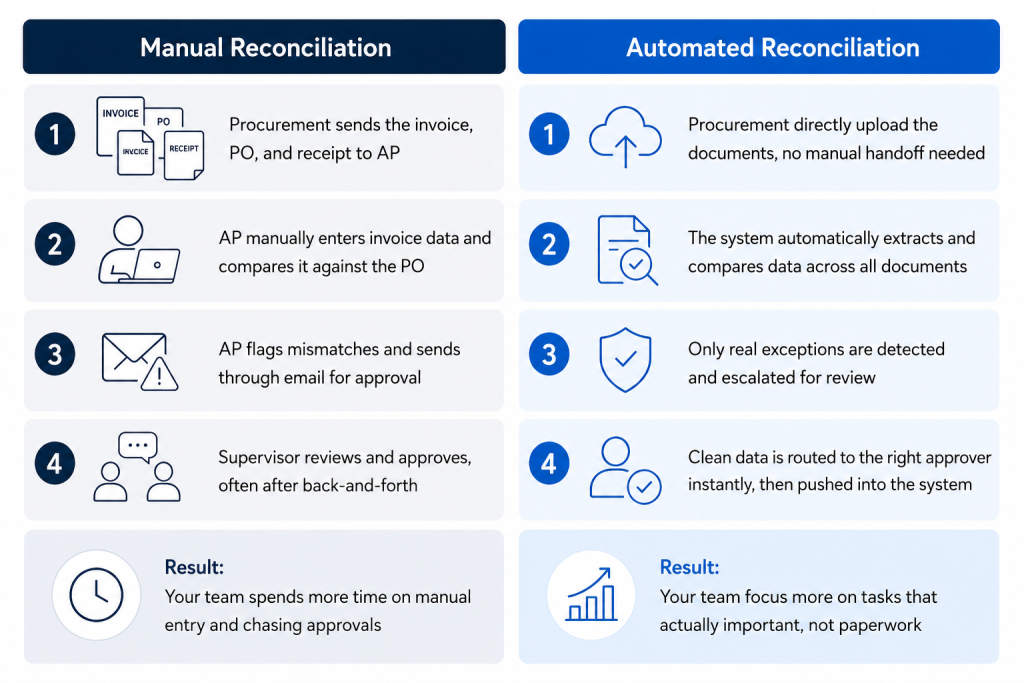
How to Automate Procurement Reconciliation Workflows
Investing in automation is about long-term cost reduction and efficiency gains as volume grows. Achieving that depends on building the workflow with the right strategy, supported by the right technology solution. Here’s how your team can start automating.
1. Centralize Purchase Data Intake
Bring purchase orders, invoices, receipts, and any other supporting documents into one place, regardless of format or source. Powered by AI OCR technology, all documents processed into structured, machine-processable data the rest of the automated workflow can actually use.
2. Set Up Validation Checklists
Decide what needs to be checked before a transaction is considered valid. This includes cross-document checks, price and quantity thresholds, and confirming required fields exist, so the system knows exactly what counts as a match versus a discrepancy.
3. Define Approval Routing and Review Checkpoints
Set clear rules for when a transaction needs human sign-off, and who’s responsible for reviewing it. This keeps oversight focused on real exceptions, instead of pulling every transaction into a manual queue.
4. Connect to Your AP or ERP System
Integrate the workflow with your accounting or ERP system, so validated transactions move forward automatically instead of requiring manual re-entry on the other end.
5. Run the Workflow and Monitor
Launch the automated workflow and track how it performs, exception rates, processing time, and accuracy, then adjust rules as needed to keep the process aligned with how your business actually operates.
How Fintelite Supports Procurement Reconciliation Automation
Fintelite AI replaces the manual matching process entirely, running extraction, validation, and approval in one workflow. Streamline your finance operations by automating 2-way or 3-way matching with custom rules that we can help set up in minutes.
Process any procurement document you need, purchase orders, invoices, receipts, and more, in any layout you receive them in, without having to configure a template for every vendor. Validation rules run on multiple variables, price thresholds, quantity checks, cross-document matches, and can be updated anytime your policies change, no code required.
With Fintelite, your reconciliation process runs automatically, end to end:
- Data from POs, invoices, and receipts are extracted and consolidated in one place
- Transaction validation against your matching rules, flagging discrepancies as they happen
- Exception automatically routing to the right reviewer, based on your approval hierarchy
- System sync with your ERP or accounting platform via API for faster settlement
Book a demo to see how your current procurement document process can be fully automated.
People Also Asked
Procure-to-pay reconciliation is the process of checking purchase orders, invoices, and receipts against each other to confirm a transaction is accurate before payment goes out. It’s the final checkpoint between procurement and finance before money leaves the business.
No. Most modern platforms, including Fintelite, let you set up extraction, validation rules, and approval routing visually, no code required. Technical teams may still be involved for deeper ERP integrations, but day-to-day rule changes typically don’t need a developer.
Automation reduces processing time from hours to minutes, lowers error rates by removing manual data entry, and cuts cost per transaction as volume grows. It also frees up finance teams to focus on higher-value work instead of manual matching.
Modern platforms like Fintelite use template-free extraction, meaning they can read purchase orders, invoices, and receipts regardless of vendor, layout, or format, without needing separate configuration for each one.
It gets flagged and routed to the right reviewer based on your approval rules, instead of stalling the entire process. Only the exception needs manual attention, not the whole batch.