


Behind an efficient business is a seamless operational workflow, where technology like OCR is utilized to make document processing faster and smoother. OCR (Optical Character Recognition) is a powerful automation for data extraction. By instantly capturing key data from documents, OCR provides a smarter way to get tasks done — a solution that every business looks for. With its proven benefits, OCR has been widely used by businesses across the APAC region, especially in Singapore. Today, there are plenty of OCR software options available, but only a few truly deliver great value. No need to spend all that time searching, we have put together the best 5 OCR software for businesses in Singapore.
Why you need OCR for your business
Manually entering key data into the system takes forever, and as your business grows, so does the volume of documents you need to handle. Will you let slow processes hold you back while your competitors speed ahead?
Here’s how OCR can make a big difference:
Simplify document workflow
Say goodbye to the never-ending loop of typing, checking, and correcting. Hello to a fully automated process! OCR converts the documents you need into structured data and integrate them straight into your system.
Reduce manual errors
Even a small mistake can lead to major problems, especially when dealing with financial data. By automating the process with OCR, extract information with high accuracy and free yourself from the worries of error-prone manual work.
Improve data accessibility
Storing documents in physical form or as PDFs not only takes up space, but also difficult to locate when needed. OCR produces digital data, turning important documents into editable data formats that you can easily process.
Best OCR Solutions for Automated Data Extraction
Fintelite
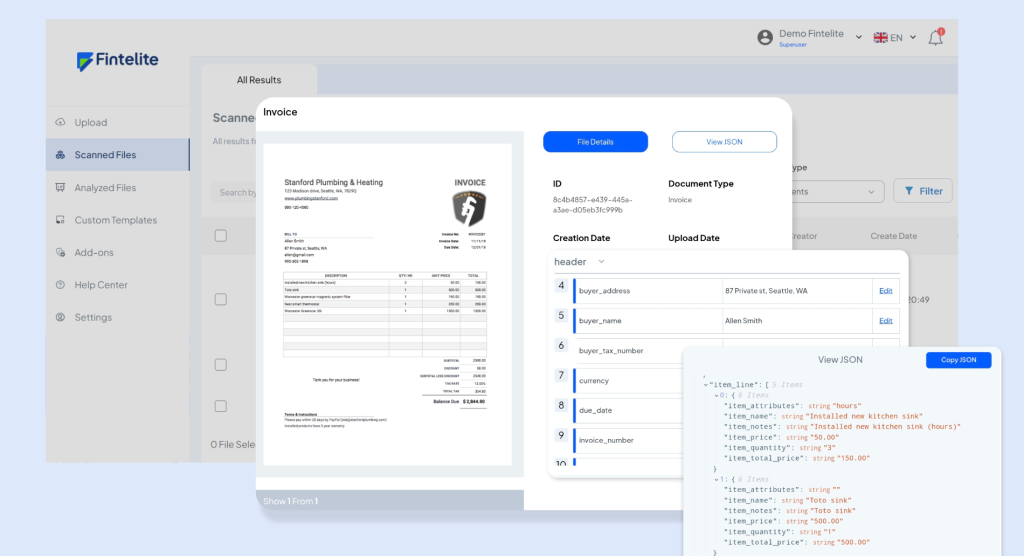
An AI-powered OCR solution that can process all types of documents with no templates required. Fintelite instantly converts printed or handwritten content into structured datasets in under a minute. It delivers high accuracy and offers fast implementation within weeks. In addition to data extraction, Fintelite is equipped with forgery detection, sending alerts if a processed document shows signs of alterations.
Strengths:
- Supports API integration
- Template-less data extraction
- Smoothly handling varying document designs, layouts, and formats
- Flexible data export to multiple formats (JSON, XLS, CSV, system-ready template)
- Customizable data extraction
Suitable for:
- Small-to-Medium sized businesses
- Financial services companies
- Insurance providers
- Supply chain companies
Hubdoc
An OCR tool under Xero that makes it easy to capture data from bills and receipts. Combining Hubdoc with Xero is a great way to fast-track the bookkeeping process. Just upload or snap a photo of the documents, publish the extracted data to Xero, and get an updated view of financial condition.
Strengths:
- Integration with other accounting softwares
- Cloud data back up
- Real-time collaboration
Suitable for:
- Entrepreneurs
- Bookeepers
- Accountants
Tesseract
Tesseract is currently the most popular open-source OCR solution. It’s free to use, with users coming from around the world. Another interesting feature is that it already supports more than 100 languages. However, utilizing open-source tools like Tesseract means you’re responsible for setting everything up into your codebase—a process that can be complex.
Strengths:
- Multi-language support
- Compatible with various programming languages
- Customizable configurations
- Flexible API solution
Suitable for:
- Developers
- Freelancers
- Data scientist
Adobe Acrobat Pro
Adobe has long been a big name in the tech world, but did you know it also has an OCR product feature? This is Adobe Acrobat Pro, a full-suite platform for PDF management, completed with OCR to make the text inside PDF documents searchable and editable. The price might be higher, but it’s a great fit if you work with other Adobe tools for a seamless ecosystem.
Strengths:
- Complete PDF processing features, from conversion to compression
- Easy sharing and collaborating
- Document e-signatures
Suitable for:
- Business professionals
- Project managers
- Administrative assistants
Docuclipper
When it comes to streamlining accounting tasks, especially data entry, this one is the right choice. Docuclipper is OCR software specifically designed for processing financial documents. Whether it’s extracting order details from invoices, purchase details from receipts, or even transaction history from bank statements, Docuclipper makes it all a breeze.
Strengths:
- Financial data extraction
- Integration to various popular accounting platforms
- Transaction categorization
Suitable for:
- Accountants
- Finance workers
- Business owners
Conclusion
Amid the increasingly competitive landscape of businesses in Singapore, leveraging OCR technology is a strategy for gaining efficiency and staying ahead. It helps streamline workflows and process documents quickly. Before integrating an OCR tool, consider factors such as user-friendliness, accuracy, and document coverage to ensure it aligns with your specific needs.
